 |
|
||
|

|

|
|||||||
| Customización y widgets para Android Programas y widgets que cambian el aspecto de tu android |
 |
|
|
Herramientas |
|
#1
 06/02/12, 19:10:20
|
||||
|
||||
|
LC Purple Go Launcher Theme EX v1.06
LC Purple Go Launcher Theme EX v1.06
Requirements: Android 1.6 and up Overview: View developer web site for instructions on how to enable sphere effect. 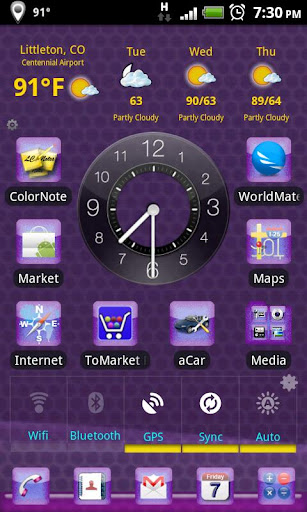  Works on tablets and supports larger icons, see tips below. If you like this theme please rate it. if you have issues, or questions email me before posting a negative comment. This is an iOS Style theme with all Purple glass icons. It requires Go Launcher EX to run, please make sure that Go Launcher EX runs on your device before installing. Once downloaded from the go launcher menu, select themes and then select LC Purple Theme. NOTE: WeatherBug Elite and Go Clock are separate apps available on the Android Market. Theme Tips • All of these themes require Go Launcher EX to run. • You cannot open the theme from the market. • Before installing, make sure Go Launcher EX runs on your device. • If the icons do not update --> Quit Go Launcher and then start it again. --> Also make sure if you have apps on the sd card that the sd card is mounted. • To enable the sphere effect as seen on the different themes, go to Go Launcher Preferences --> Effect Settings --> Select Horizontal or Vertical Scroll Effect --> select Sphere. • To move to the SD card you must be running Android OS 2.2 or higher. • To make icons larger go to Menu --> Preferences --> Visual Settings --> Icons --> Icons Size Widgets seen in some of the themes: • Go Clock Widget: https://market.android.com/details?id=smsr.com.acc • Analog Clock Widget: https://market.android.com/details?i...et.clockwidget • Analog Clock Widget: http://forum.xda-developers.com/show....php?t=1107977 • Widgetsoid 2.x: https://market.android.com/details?id=com.jim2 • Powerful Switchman: https://market.android.com/details?i...droid.switches • WeatherBug Elite: https://market.android.com/details?i....android.elite Let me know if there are any icons you would like added and please rate the theme. Also if you would like a theme in a particular color let me know. Please check out my other themes. Weather in screen shot is Weather Bug Elite. Clock is from Analog Clock Collection or Go Clock WIdget Widgets are from Widgetsoid You cannot open the theme from the market you must install it from Go Launcher Themes menu option. More Info: Código:
https://market.android.com/details?id=com.lc.purpletheme http://turbobit.net/demrywfjz9lp.html http://ul.to/r24wafel http://www.filefat.com/mqxydjzsvj4w/...v1.06.apk.html 
|
|
|
|
 Estás aquí
|
||||||
|
||||||


![Array
[xs_avatar]](https://avatar.htcmania.com/avatares/unknown.gif)
