 |
|
||
|
#1
 09/04/26, 16:14:00
|
||||
|
||||
 SwitchBot AI Hub Review
SwitchBot AI Hub Review  SwitchBot has evolved from making small "mechanical fingers" that pressed switches to attempting to conquer the nerve center of our homes. With the launch of the SwitchBot AI Hub, the brand doesn't just present a successor to its popular hubs; it proposes a paradigm shift: moving from a simple connection bridge to a domestic AI agent. After a few weeks of testing it alongside one of their new cameras, these are our first impressions of a device that promises privacy, local power, and total integration... though not without some fine print. Let's check it out.  On the table, we have the new SwitchBot AI Hub in its box, promising to be our "personal AI assistant," and beside it, the SwitchBot Pan/Tilt Cam Plus 3K for perimeter security. A pair that looks great together.  The back of the box leaves no room for doubt: the SwitchBot AI Hub is the core of a modular system. The diagrams show how it combines with cameras (2K/3K), the small Bots for pressing buttons, color bulbs, curtain motors, and even air purifiers. It is the "glue" that promises to unite the brand's entire ecosystem.  Let's look inside.  This is the complete content.  No detail is missing in the documentation. Manuals in several languages and the warranty card; the brand's classic "welcome kit." Although most of us will jump straight to the app for configuration, it's always appreciated to have the physical guide handy in case of any doubts during initial pairing.  To feed the "beast," just any mobile charger won't do. The hub includes its own 12V and 1.5A (18W) power adapter.  With a 6 TOPS NPU processing video and managing AI locally, the device requires a stable and dedicated power supply so it doesn't falter when we push it with several simultaneous cameras.  Now for the true protagonist of the review. The SwitchBot AI Hub is pure discretion. It has a compact, rectangular format with very rounded edges that fits perfectly in the palm of your hand. The finish is a matte black with a subtle "frosted" effect that, besides giving it a premium touch, helps prevent fingerprints from showing at the first touch. It’s the typical device you can leave on the living room furniture without it looking like a technological "clunker," integrating perfectly into any modern decor.  On the right side, we find the microSD card slot, an element vital to this device's value proposition. As an intelligence center that bets on local processing, having physical storage so accessible is what ensures privacy is real and not just a commercial promise. Through this slot, the user can manage all camera recordings using systems like Frigate or SwitchBot's own NVR without depending on external servers. It’s a great move that the hub includes a 16GB card to start, but the most relevant point is that it supports up to 1TB of capacity. This allows the user to forget about monthly cloud storage fees and maintain total control of their security within the four walls of their home.  The back of the device is where its technical versatility and expansion capacity are truly appreciated. We find a jack power input to connect the 18W power adapter, freeing up data ports for other functions. Right next to it are two USB-C connections that, although they look the same, serve different purposes. One is marked with the SuperSpeed symbol for high-speed tasks or critical data, while the other offers standard connectivity for peripherals like Ethernet adapters or video outputs. Completing this panel is a small reset hole to return to factory settings if necessary. This port configuration is what allows the hub to stop being a simple wireless bridge and become a local server capable of wired network connection or even displaying information on an external screen. It’s a clean and functional layout that makes good use of space without cluttering the minimalist design seen from the top.  On the remaining side of the SwitchBot AI Hub, we find a warning label emphasizing the importance of this equipment as a data manager. The message reminds us always to turn off the device before disconnecting any external storage unit, reinforcing the idea that this is not just a connection bridge, but a small home server that treats information seriously and structurally. This precaution is fundamental because when managing high-resolution video recordings and local AI databases, an accidental disconnection could corrupt stored files.  To finish the physical tour, the base of the SwitchBot AI Hub maintains the same attention to detail as the rest of the chassis. It features two generous non-slip rubber strips running along the sides, ensuring the device stays firm on any surface, even with several cables connected to the back. It’s a simple but necessary construction detail for a device that, due to its lightness, could easily be moved by the tension of power or network cables.  The SwitchBot AI Hub gives a sense of technological maturity that is appreciated. Unlike other control centers that feel like simple light plastic toys, this device has a weight and finish that convey greater robustness. Its surface with that slight metallic sheen gives it a "small server" vibe that fits perfectly with its purpose of being the thinking brain of the house, moving away from cheap gadget aesthetics to position itself as a central piece of hardware.  The most remarkable thing is how SwitchBot has managed to concentrate so much expansion capacity into a body that remains extremely compact and discreet. It’s a difficult balance to achieve: you have a device that doesn't draw attention on a shelf, but when you turn it around, it offers connectivity that many competing hubs would envy. In hand, it feels like a premium product, well-finished and ready to handle the workload of managing an advanced smart home without clashing aesthetically.  Let's briefly review the visual aspect in video. Before continuing, let's look at the camera. This is the SwitchBot Pan/Tilt Cam Plus 3K, a device that, right from its packaging, makes it clear that resolution is one of its strong points. The box features a clean and direct design, highlighting the jump to 5 megapixels to offer superior clarity compared to what we usually see in standard home cameras. It's interesting to see SwitchBot boasting about its Red Dot Winner award, which gives us a clue that the aesthetic care seen in the hub extends to its peripherals as well.  On the side of the package, the brand again emphasizes the idea of a modular ecosystem, showing how this camera integrates with motion sensors, contact sensors, or the famous curtain motors. As with the hub, the presentation is professional and functional, focused on explaining to the user that this camera is not just a passive monitor, but another sensor that can trigger actions throughout the house thanks to its 360-degree vision.  Let's see the package contents.  The included power adapter for the camera is a standard white model delivering 10W (5V and 2A). Although it has lower power requirements than the hub, this charger is responsible for providing the energy needed for the tilt-and-turn motors and the 3K image sensor to operate with total fluidity.   We also have several manuals here.  To facilitate installation in any corner, SwitchBot includes a simple but very practical mounting kit. In the image, we see the plastic circular base along with the necessary wall plugs and screws, a set that allows the camera to be securely anchored to both walls and ceilings. Having this accessory as standard is fundamental to truly taking advantage of its 360-degree vision, as it gives us the freedom not to be limited to a flat surface. It’s a detail that reinforces the equipment's versatility, ensuring the 3K sensor always has the best possible perspective without having to purchase additional hardware.  The package is completed with a generously sized white charging cable and the essential metal clip to operate the reset button. These are the last accessories needed to get the camera running and ensure we can perform the initial sync or reconfigure it comfortably at any time.   The SwitchBot Pan/Tilt Cam Plus 3K features a design with very clean and organic lines, with a shape reminiscent of a small capsule or egg. The contrast between the matte white of the body and the central black sphere gives it a modern and technological look that is not aggressive to the eye. It is a device designed to go unnoticed in the home while monitoring in all directions, maintaining the visual consistency we already saw in the AI Hub.  The 3K sensor is integrated into the center of that black "ball," which is responsible for vertical movement while the base allows for full horizontal rotation. In hand, it feels light but well-built, with finishes that confirm SwitchBot has moved up a step in the quality of its materials for this new generation.  On the back of the camera, a circular grille highlights the integrated speaker, a key element for enabling two-way communication or for the device to emit sound alerts in case of detection.  Just below, at the edge of the base, we find the USB-C power port.  The camera base is designed for both resting on flat surfaces and fixed mounting. It features four small rubber feet providing excellent grip, preventing the device from sliding or vibrating when internal motors are in full motion. In the center, the circular hollow is designed to fit perfectly with the wall or ceiling mount we saw earlier, including very intuitive lock icons indicating which way to turn to lock or release the camera from the anchor.  Ultimately, the camera is the perfect visual complement to the AI Hub, sharing that philosophy of technology that "is there but doesn't bother."  Let's see it in video as well. Delving deeper into the capabilities of this set, we enter the territory of artificial intelligence applied directly to surveillance. Although the camera and hub work wonderfully on their own, SwitchBot proposes a step further with its AI+ subscription (currently in Beta phase). This plan, which costs €8.99 per month (though often found on introductory offer for €4.99), seeks to transform security videos into useful and digestible information through the use of visual language models.   One of the most striking features of this service is the system's ability to narrate recordings in plain language. Instead of receiving a generic "motion detected" alert, the hub analyzes the scene and can explain exactly what is happening, also recognizing familiar faces if we have configured them previously. This allows notifications to stop being a nuisance and become a contextual summary of who did what and when, adding a much more human layer of peace of mind. The power of this AI is especially noticeable in semantic search. Forget about scrolling through the timeline for minutes to find a specific clip; with AI+, you can search by concepts or specific moments, such as "when did I leave my keys" or "find so-and-so in the kitchen." Additionally, the system generates daily reports of domestic activity summarizing movement in the house, which is ideal for monitoring without having to review hours of footage. Finally, and no less relevant, this subscription enables the creation of automations and notifications based on scenarios described with natural language, allowing you to configure complex rules without needing to program traditional conditions. A big point in its favor is that this intelligence is not limited to the brand's products but works with cameras from any manufacturer as long as they support the RTSP protocol. This turns the AI Hub into a universal analysis tool for your current security system, although the monthly subscription fee is a factor each user must weigh according to their needs. The SwitchBot AI Hub is top-tier hardware, but without the AI+ subscription, the set loses a large part of its appeal. It is frustrating to see how the device's true "magic," the part that sets it apart from any other hub on the market, is locked behind a monthly fee. Without this subscription, we are left with very powerful equipment that feels underutilized, as if we had a racing engine limited by software. For the average user, this dependence on a recurring payment model is a direct blow to the product's real value. If you aren't willing to shell out those extra 9 euros every month, the investment in the Hub along with the 3K camera makes less sense, as you precisely miss what makes it special: that ability for your home to "understand" and narrate what happens in it in natural language. Without the AI+ layer, the device remains a very efficient local manager, but it loses the differential factor that justifies its premium price. In addition to the advanced plan, there is a more "down to earth" option for €3.99 per month that focuses on standard features: unlimited cloud storage and basic pet or vehicle detection. It's the typical toll we already know from other manufacturers for features that are almost considered basic today. The underlying problem doesn't change: although this plan is more affordable, it still leaves the AI Hub out of the game regarding its truly innovative functions. If you stick to the basics, you end up with a conventional camera and a standard subscription, once again losing that differential value the Hub promised. Without the jump to the superior plan, the set feels like "just another one" in a market already saturated with subscriptions for minimal services.   Of course, it's important to emphasize that the SwitchBot Pan/Tilt Cam Plus 3K does not become a brick if you decide not to pay monthly. Without any subscription, the experience remains very solid and functional through the official app. You can manage the head movement, see the live feed at any time, and configure basic motion alerts that will notify your mobile if someone enters the frame. It works exactly like any other high-quality smart camera on the market, also allowing you to record clips locally if you insert a microSD card, giving you that much-sought-after independence. What stands out from the first minute of use is the hardware's agility. The tilt-and-turn motor is remarkably fast and quiet, responding to app commands almost instantly, which greatly facilitates manual tracking of any object or person. But where it truly shines is in its image quality. The 3K definition is very noticeable compared to standard 1080p models, offering clarity that allows you to zoom in without the image turning into a pixel soup. It is, in short, a very capable surveillance camera in its own right, even if you decide to completely ignore its advanced AI functions. The available options are basically what is expected in any other high-quality camera.    If you finally opt for the AI+ advanced plan, the experience with the camera changes completely, and we start to see the true potential of that visual language model SwitchBot boasts about. With this subscription active, every time the camera detects motion and captures an image, the system attaches a brief textual description of what is happening in the scene. The interesting thing here is that the AI isn't limited to generic labels; it can interpret situations with considerable fidelity, detailing if someone is reading a book, if the dog is trying to get on the couch, or if you left your keys on the entry table.  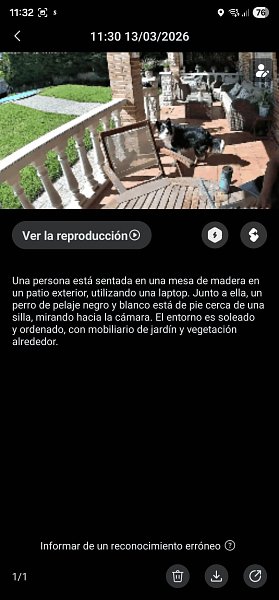  It's important to note that this analysis process is not instantaneous. The system takes its time to process information and usually takes about a minute to show the description alongside the clip or photo. Although in a world of immediate notifications this delay might seem like a drawback, the reality is that the accuracy of the texts compensates for the wait. Being descriptions so true to reality, they become a very valuable text database that allows us, for example, to perform advanced history searches simply by typing what we want to find, avoiding having to manually review hours of video. In addition to searches, this textual record is the key piece for configuring those complex automations we mentioned before. By having a clear description of the scene, we can create rules like "if the camera detects a man lying on the sofa, turn on the reading lamp," elevating the smart home concept to a much more contextual and human level. Ultimately, it is this information flow that justifies the jump to the premium plan, turning every detection into processable data that actually helps manage day-to-day life, despite that small time lapse necessary for the AI to "understand" what it just saw.  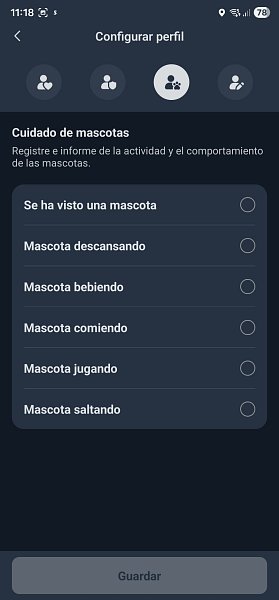 As mentioned previously, we can also detect faces if we have saved them in the app beforehand.   If we don't have any plan purchased, the app will limit itself to showing detected movements.  Now let's talk about Frigate, another option included in the hub.  To understand it quickly, Frigate is a video recording system (NVR) that uses local artificial intelligence to monitor your home. Instead of being a simple recorder, it is a "watchman" that analyzes in real-time what the cameras see to distinguish between a person, a car, or a dog, allowing all that processing to stay inside the SwitchBot AI Hub itself without any image having to travel to external servers. Its great appeal is that it presents itself as the ultimate alternative to paid plans. By running object detection directly on the hub's AI chip, you get smart notifications and detailed logs completely free and privately. It is the ideal solution for those seeking the advantages of smart security but refusing to be tied to a monthly subscription for their camera to know how to differentiate a human from a moving branch. That said, one must be realistic about power: being local processing, the system is less "smart" than cloud AI. While the advanced paid plan can write an almost literary description of what's happening, Frigate focuses more on precise labels and fast detections. It’s quicker to fire immediate alerts, but don't expect the same depth of semantic analysis offered by the massive language models running on SwitchBot's servers.  After several days of use, this is where we start to see the seams of local processing versus the raw power of the cloud. While person detection is quite solid and reliable, identifying subjects quickly even at difficult angles, the system becomes much more creative and erratic with other everyday objects. It’s curious to observe how local AI tries to make sense of what it sees, but doesn't always succeed. A perfect example of this is tracking inanimate objects. In our tests, the system went as far as identifying a simple cardboard box as if it were an umbrella with a 73% confidence level. This lack of precision reminds us that while Frigate is an excellent tool for avoiding subscriptions, it is still a step behind in "visual understanding" compared to advanced paid models. For critical security where you need to distinguish specific objects, these local AI hallucinations are an important factor to consider.   Surely it works much better with more substantial and well-defined objects. For example, an open garage door. Another interesting feature of this SwitchBot AI Hub is that it integrates Home Assistant as standard, although it's important to clarify which version we are handling.  We are not looking at a full operating system (HAOS) with its usual add-on store or "Supervisor," but rather a containerized Core version. This is a smart technical decision by the brand, as it allows the system to be extremely agile and light, reserving all the AI chip's calculation power for video and language processing while Home Assistant handles exclusively the automation logic. Although at first glance it might seem like a "cut down" version since it lacks the traditional Add-ons menu, the home automation engine is completely functional and professional.  You have a top-tier domotic brain that works locally and privately, but with simplified management where SwitchBot handles the heavy system maintenance so you only worry about creating your rules and dashboards. It is the ideal solution for those seeking the power of Home Assistant without the complications of configuring and maintaining their own server from scratch. I'm not going to explain how Home Assistant works step by step because, let's be honest, it's not exactly an intuitive system and we could write an entire encyclopedia about it, which is not the object of this review. It is an environment with a significant learning curve, and going into configuration details would take us away from what really matters about the hardware we have on the table. The truly relevant part is that you have it available and installed by default directly on the Hub, which means a huge saving of time and headaches by not having to mount your own server from scratch. It’s a total win for SwitchBot: they deliver the world's most powerful home automation tool ready to use, so you decide how deep you want to go without the usual technical entry barriers. We finally reach the true protagonist of this SwitchBot AI Hub: OpenClaw. It is such a vital component that the manufacturer highlights it as the core of its proposal in all official advertising, and with good reason. For those who don't know it, OpenClaw is the system responsible for providing our home with a fully local intelligent voice and ear. Basically, it is the assistant that allows us to interact with our home through natural language, processing our voice requests directly on the device without the audio ever having to leave our four walls for external servers.  However, the approach SwitchBot has taken with this integration must be very clear. Just as with Home Assistant, we are not looking at a "bare" version of OpenClaw where we can tinker with the deepest parts of the code; what runs here is a containerized version, and therefore, we do not have root permissions. This might be a bit of a cold shower for advanced users wanting to modify every bit of the system, but it has a clear advantage: stability and ease of maintenance. The development pace is absolutely frantic, something evident after receiving at least five firmware updates in barely a month, showing that the manufacturer is polishing and improving the system's intelligence almost daily. Configuring OpenClaw is not exactly a bed of roses, and I won't stop to explain the process step by step because it would lead us astray, plus it has its complexities if you aren't familiar with the environment. The key to the system lies in feeding the local "brain" with a paid AI API, such as OpenAI's, which is the one I used. Once the system has access to that external intelligence, you can interact with it through OpenClaw's own dashboard (web or console) or even take that communication to external platforms like Telegram or WhatsApp. For someone who already has a bit of experience in these matters, the first steps are logical and direct, but for the average user, it remains a configuration that commands respect.   The true obstacle that appears sooner or later with OpenClaw is the economic factor of tokens. Every request you make to the house has an associated cost and, although for sporadic tasks you'll barely spend a few euros a month, if you intend to delegate constant and full domestic management to the AI, the bill can start to sting.  We are in an interesting moment with the arrival of models like Gemma 4, which promise to be a free and local alternative and which I still need to test to see if they can truly retire the paid APIs. Despite this cost, the Hub's hardware behaves very agilely and responds quickly, although always with that limitation of not having root permissions due to working inside a container controlled by the manufacturer.  What really separates this Hub from anything else we've seen so far is how SwitchBot has leveraged OpenClaw's potential to create its own natural language "skill." Being able to tell the system something as human as "at ten at night turn on the bedroom fan" and having it handle the interpretation of the time, the device, and the action is a massive leap forward. Compared to the rigidity of Alexa or Google Home, which still force us to use almost pre-fabricated phrases, what SwitchBot proposes is playing in another league. It is basically what we all expected home automation to be: a house that understands you without you having to learn its language, although for now, we have to pay that toll for every smart command we issue.  A real example: I asked it to close one of the curtains in 5 minutes. That curtain has an opening and closing mechanism from the same manufacturer. This is what it told me.  And this is what a conversation with my assistant looks like, for example, from Telegram.   In any case, we must be aware that this ecosystem still has a long way to go and much room to evolve. It’s not so much a matter of SwitchBot or the raw power of its machine, but of the maturity of OpenClaw as a global platform. We are looking at a living project that improves almost daily and whose evolution does not stop. In fact, receiving so many firmware updates in barely a month is the clearest proof that we are in full expansion and constant polishing of this digital "brain." SwitchBot's great merit has been laying the necessary physical foundations, that local AI engine, so we can jump on the home artificial intelligence train without extreme technical complications. The great hope for the near future is that as OpenClaw continues to grow and more efficient models like Gemma 4 settle in, we can finally free ourselves from the economic dependence on paid APIs. It’s a brave bet on the future where the hardware is already prepared and only the software needs to finish maturing so that promise of a house that understands us naturally, privately, and for free becomes an absolute reality. Wrapping up. After thoroughly squeezing this SwitchBot ecosystem, it's clear we're facing a paradigm shift in home automation. It's not just a hub and a camera. It's a brave attempt to put real intelligence into our homes. Let's see what I liked most and what still doesn't quite convince me. The Best
So... who is this product for?
More info on the official website, here https://bit.ly/4tzFMhN Puedes leer la review en español aquí. 
|
|
|
 |
 Estás aquí
|
||||||
|
||||||


![Array
[xs_avatar]](https://avatar.htcmania.com/avatares/avatar1638141_1.gif)

