 |
|
||
|
#1
 25/02/26, 13:14:48
|
||||
|
||||
 Terramaster D1 SSD Pro Enclosure Review
Terramaster D1 SSD Pro Enclosure Review  If you think back a few months, you might remember when the TerraMaster D1 SSD Plus enclosure passed through our testing table. That "little gadget," with its 40 Gbps interface, left a very good impression on me regarding both build quality and performance. But you know how technology works: we always want more speed. Well, the brand has decided to up the ante, and today I bring you its big brother, the new TerraMaster D1 SSD Pro. We keep that premium design philosophy we liked so much, but under the hood, we find a real beast: native USB4 compatibility and Thunderbolt 5 ready, which sky-rockets its theoretical bandwidth up to 80 Gbps. Are we looking at the definitive enclosure to squeeze the most out of our fastest NVMe SSDs? Get comfortable, as we are going to check if this performance leap is noticeable in daily use.  Here we have the newly arrived protagonist. As you can see, TerraMaster maintains a sober and elegant presentation line, with a dark box that already hints we are dealing with a "Pro" range product. They don't beat around the bush: on the front, that 80Gbps stands out, almost shouting, over a speed graphic. It's a true statement of intent. You can also read the slogan "Lightning Fast and Zero Noise" at the bottom, confirming that, unlike other high-performance enclosures that sound like turbines, this one bets on total silence thanks to passive dissipation.  If we look at the bottom of the box, the brand summarizes the technical roadmap in a very visual way. The most striking thing is undoubtedly that future-proofing with native support for Thunderbolt 5 and 4, in addition to backward compatibility with almost any USB-C generation. The figures are scary: they theoretically promise up to 7061 MB/s transfer speeds, a speed that until recently was unthinkable for an external medium. They also confirm it supports NVMe SSDs in 2280 format and, vital for our ears, 100% passive cooling compatible with the most current operating systems.  Upon lifting the lid, the feeling of a premium product is immediately confirmed. TerraMaster hasn't just placed the device in a simple plastic mold; instead, we are greeted by a rigid carrying case with a very pleasant textile finish and the brand logo presiding over the center. This seems like a total win to me, because if the idea is to carry our data from one place to another, having a dedicated case that protects the aluminum from scratches or bumps in a backpack is highly valued. Also, if you look to the left, perfectly fitted in its own compartment, a screwdriver peeks out. It's a detail I love: they are telling us we have everything needed to start tinkering from minute one without having to look for tools around the house.  Once we take everything out of the box, we find a very well-thought-out kit so we don't have to buy anything separately. In the center of the image, the D1 SSD Pro enclosure shines with its own light. The design is industrial and very attractive, built entirely in an aluminum alloy that not only gives it a premium look, but those fins running along the entire body are fundamental for dissipating heat passively. It feels robust and solid, nothing like those cheap plastic enclosures that flood the market. Beside it, we have the essential accessories: a USB-C cable that looks quite thick and high-quality—vital if we want to reach those 80 Gbps without losses—and a thermal pad ready to be attached to our SSD and transfer heat to the chassis. We also see the screwdriver I mentioned before and the usual documentation. All of it fits perfectly in the rigid carrying case you see on the left, ideal for keeping the whole set protected in a backpack.  The case deserves a special mention. Far from being a simple add-on, TerraMaster includes a high-quality rigid case with the logo on the top cover. The interior has a soft finish to protect the aluminum from scratches and features an elastic mesh perfect for keeping the cable and screwdriver always organized. It's the ideal complement to throw the SSD into the backpack and forget about problems.   To finish with the box contents, we find the usual paperwork: the quick installation guide in several languages and the warranty card. All very standard, but necessary.  And here we have one of the key pieces of the puzzle: the USB-C cable. Look closely at the engraving on the connector because it's no small detail: it certifies 80Gbps data transfer and supports up to 240W charging. It's a short cable (standard and necessary for these specs to avoid signal loss/interference), but it feels very robust and thick to the touch.  I want to emphasize this: treat this cable like gold. Although the port is USB-C, if you try to connect the enclosure with a mobile charging cable or a cheap one you have in a drawer, performance will plummet and you won't see those breakneck speeds by a long shot. For this device to truly fly, it is essential to use this cable or a certified one of the same category.  This is the screwdriver.  Finally, we find this textured thermal pad. Indeed, it is a spare (or for the initial assembly if one wasn't already placed), and it's a fantastic detail. Without this pad making contact between the SSD and the aluminum body, passive dissipation wouldn't work. The fact that TerraMaster includes an extra one ensures we can change drives in the future without having to hunt for thermal replacements.  Let's get to the enclosure, the true star of this review. Getting into the design, the first thing you perceive when holding the D1 SSD Pro is that it's not a toy. It is a solid block of aluminum that conveys immediate robustness. As you can see in the photo, the size is generous. It has that "premium" weight (about 300g) confirming there's good material inside. What really defines its aesthetics are those deep dissipation fins running along the top. Far from being a simple ornament, this channeled design is pure functional engineering: its mission is to maximize the surface contact with air to cool the SSD passively. It's an industrial, serious design meant to perform.  If we look at one of the ends, we find the true control center: the USB-C port. Right below it, a small but crucial engraving reminds us we are looking at an 80Gbps interface. We can also see the hole for the status LED, which will indicate the quality of the connection. The aluminum finish here is impeccable, with smooth machining that denotes quality on all sides.  Regarding this LED, as we mentioned, it offers an instant "visual diagnosis" of our connection quality. If the LED shines white, it confirms we are connected to a maximum performance port (Thunderbolt 5/4/3 or USB4). If it turns orange, it warns us that the connection is standard (USB 3.2 or lower). It's a fantastic way to know at a glance, without opening any software, if our port is acting as a bottleneck.  Little to see on the other end of the enclosure.  If we change perspective, we can better appreciate the depth of the dissipation fins I mentioned before. It's not just aesthetics: look how the design creates air channels so that cooling is effective even without a fan. Also, at one of the ends, we see those small rubber feet. They are discreet but fundamental so the unit doesn't slip on the table and to prevent the aluminum from scratching the surface where we place it.  On one of the sides, almost camouflaged among the cooling fins, we find the locking screw. It's the only access point to the interior, which simplifies things a lot. Simply loosen it using the included screwdriver to release the mechanism and separate the two halves of the chassis. I like that it's so integrated, keeping the clean aesthetic without unnecessary complications.  A detail that demonstrates the level of engineering of this D1 SSD Pro is that the locking screw is captive. This means that, even if you loosen it completely to open the enclosure, the screw does not detach from the body.  It's a fantastic solution to prevent it from dropping or getting lost while handling the drive, something that is greatly appreciated if you have to open it on the go or in low-light environments.  A short video before continuing. Let's see the interior.  Opening the TerraMaster D1 SSD Pro, we find an extremely clean and well-thought-out internal design. As you see in the photo, the enclosure is divided into two symmetrical halves of solid aluminum. In one of them rests the PCB board, where we will connect our drive, while the other half acts as a cover that seals the assembly.  A fundamental detail is that the inner lid already comes with a pre-installed thermal pad of generous dimensions. It's vital to remember to remove the protective plastic (the one that says "Step 1") before closing the case. This pad is responsible for transferring all the heat generated by the SSD directly to the aluminum chassis, allowing the outer fins to do their passive cooling job without the need for fans.  The internal board is compatible with M.2 NVMe 2280 units, the most common standard on the market. Installation is foolproof: plug the drive into the connector and secure it with the small screw you see at the end of the board. It's a process of barely two minutes that anyone can do at home with the screwdriver provided in the box.   For our tests, we used a 1TB Kingston SSD unit. It uses the PCIe Gen4 interface and has the M.2 NVMe format. It is a very balanced unit, perfect for daily use and for storing games or heavy data.  But here is where we must make a very important technical aside. The TerraMaster D1 SSD Pro is a device ahead of its time, capable of theoretically reaching 80 Gbps. However, to reach that stratospheric speed, the stars need to align: a top-tier SSD drive and, the hardest thing to find nowadays, a computer with a USB4 version 2.0 or Thunderbolt 5 port. In our case, connecting it to a standard machine without these latest-generation ports, the bottleneck is generated by the computer itself, not the drive or the enclosure. Therefore, using a faster or more expensive SSD unit wouldn't have made any difference in the final results, as we are limited by the PC's USB port bandwidth. The good thing about this product is its future capacity: right now you will squeeze the most out of your current connection, and you know you have plenty of enclosure for when you upgrade your computer in the future.  Let's move on to what really matters: the numbers. I have tested the D1 Plus on both MacOS (with a recent iMac) and Windows. First with the iMac and using the MacOS version of CrystalDiskMark, which is called AmorphousDiskMark.  As you can see in the screenshot, the results are very revealing. In reading, we reached more than 3400 MB/s, a fantastic figure that confirms we are completely saturating the bandwidth of a 40Gbps Thunderbolt 3/4 port. In writing, the figure stays at around 1600 MB/s. The enclosure is delivering the absolute maximum that our current computer is capable of receiving. 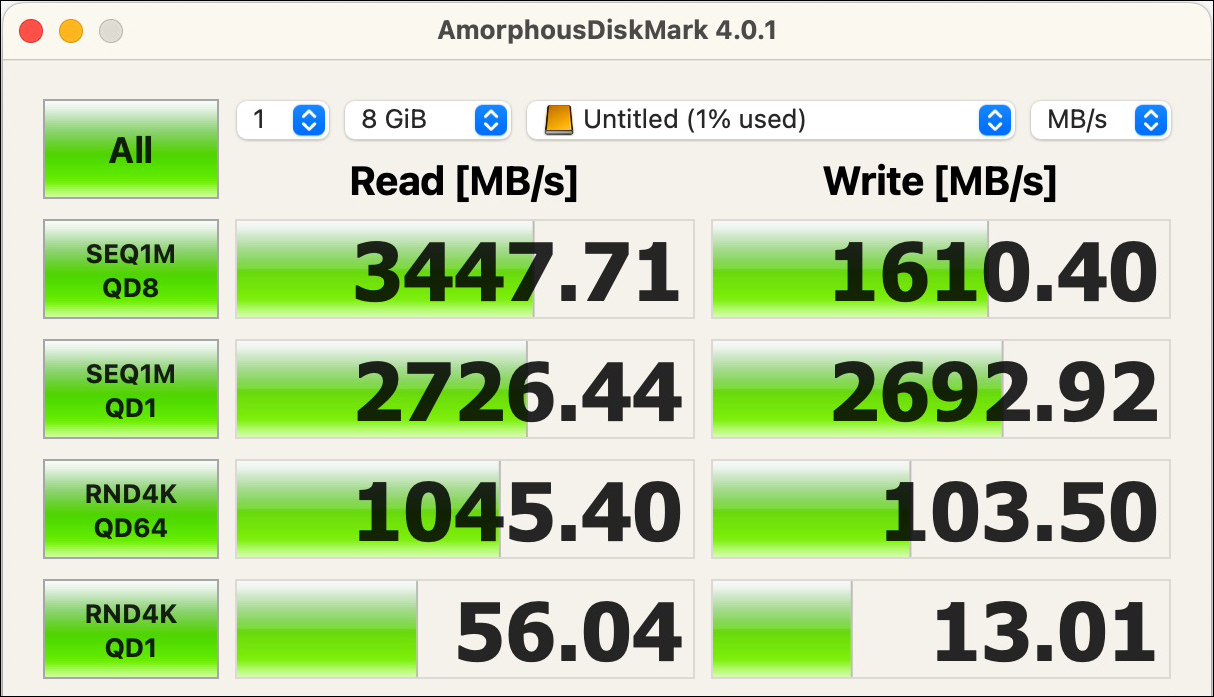 Running a similar test on Windows 11, the result is even better. It is a more powerful computer with more advanced ports. 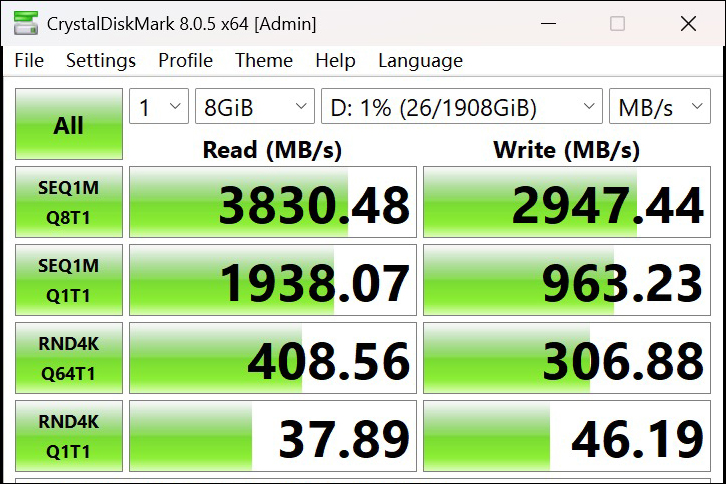 The story would change radically if we connected the D1 SSD Pro to a USB4 v2 or Thunderbolt 5 port with a high-end drive. In that scenario, by doubling the bandwidth to 80 Gbps, speeds would theoretically skyrocket up to 7,000 MB/s. Therefore, you buy this enclosure today for excellent performance, but its true value lies in being ready for the next generation of computers without spending another dime. One of the most remarkable points of this design is the absolute silence. By betting on totally passive dissipation (no fans), the noise is literally zero (0 dBA), something you will greatly appreciate if you work in silent environments or recording studios. Forget the annoying high-pitched hum typical of other high-speed enclosures that need tiny fans spinning at thousands of revolutions. Regarding temperature, you have to understand the physics of the device: the enclosure is going to get hot, and a lot. If you touch it after a while of heavy use and it's hot, it's an excellent sign. This means the aluminum chassis is doing its job of "stealing" the heat from the SSD and bringing it outside. Thanks to those deep cooling fins, the internal drive stays cool and stable, avoiding speed drops due to excess heat (thermal throttling), even if it feels hot to the touch on the outside.  To finish setting the scene, and taking advantage of having the previous generation at hand, the D1 SSD Plus, we wanted to put them head to head. As you can see in the images, the generational leap is also noticeable on the outside. The new Pro version has gained muscle; it is notably longer and more voluminous than its predecessor.  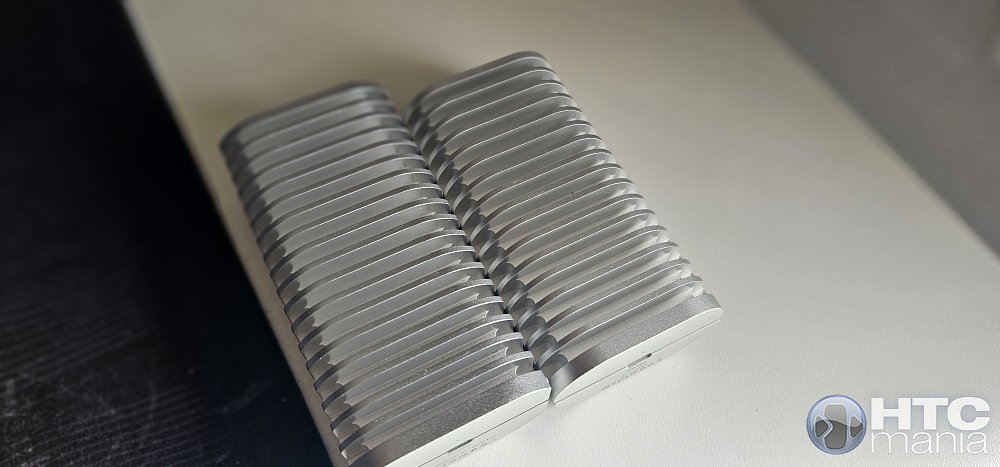 The design language has also changed. While the Plus version had softer lines and rounded ends, the new Pro bets on a much more industrial aesthetic, with straight edges and sharper corners. This increase in size and this "rawer" design are not for pleasure; they are a physical necessity to have more aluminum mass and be able to passively dissipate the extra heat generated by the 80Gbps components. 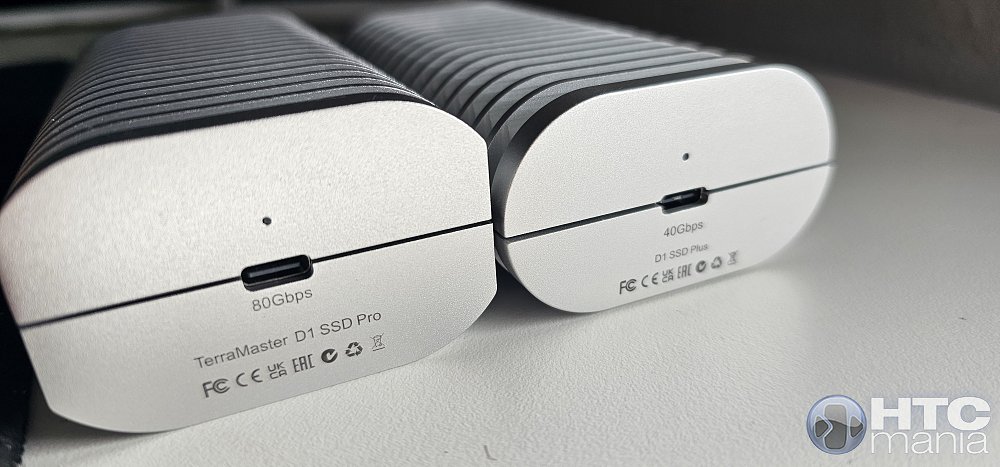 We reach the end of the road and it's time to address the thorniest issue: the price and the target audience of this device. The TerraMaster D1 SSD Pro currently costs 254.99 dollars. Let's be totally honest: if we look at it as "a simple box to put a hard drive in," the figure is scary. If you are an average user who only needs to move photos occasionally or make a weekly backup, there are 10Gbps enclosures for 30 or 40 euros that will serve you perfectly. This product is not for that use. So, who the hell is this 250 dollar enclosure for? This unit points directly at a very specific niche: the creative professional and the extreme tech enthusiast. We are talking about people whose time is worth real money.
I leave you the official specs sheet with all the info. https://www.terra-master.com/es-es/products/d1-ssd-pro Puedes leer la review en español aquí 
|
|
|
 |
 Estás aquí
|
||||||
|
||||||


![Array
[xs_avatar]](https://avatar.htcmania.com/avatares/avatar1638141_1.gif)

