 |
|
||
|
#441
 26/10/12, 13:32:45
|
||||
|
||||
|
ondemand/noop
Enviado desde mi HTC One S usando Tapatalk 2
__________________

|
| Gracias de parte de: | ||
|
|
|
#442
26/10/12, 13:38:45
|
||||
|
||||
|
Ok, gracias, lo pongo asi a ver que tal.
Esta rom va que vuela...me costara volver al sense. Ya se me ha pasado hasta el ansia de que htc saque la ota de Jelly Bean 
|
|
#444
26/10/12, 14:37:15
|
||||
|
||||
|
A alguien no le funciona el sonido? Cuando pongo la alarma, no suena, y con alguna aplicación tampoco.. :confused:
Enviado desde mi HTC One S usando Tapatalk 2
|
|
#445
26/10/12, 14:39:34
|
||||
|
||||
 Cita: Originalmente Escrito por azhd100 Cita: Originalmente Escrito por azhd100

hl me podeis decir como instalar este firm? ahora tengo la ruu oficial 2.31 con el bootloader desblokeado y root.
 Download the ROM Download Gapps Extract the boot.img from the ROM and flash it in fastboot Boot into TWRP recovery and factory data reset Install the ROM, then install Gapps Reboot Acuerdate de pasar la rom y las gapps a tu movil antes de nada y luego sigue las instrucciones. Si tienes alguna duda ya nos dices.
|
| Gracias de parte de: | ||
|
#446
26/10/12, 14:44:30
|
||||
|
||||
|
Cita: Originalmente Escrito por jmgasparin
A alguien no le funciona el sonido? Cuando pongo la alarma, no suena, y con alguna aplicación tampoco.. :confused:
Enviado desde mi HTC One S usando Tapatalk 2 Asi de primeras es lo unico que se me ocurre.
|
|
#447
26/10/12, 21:10:10
|
||||
|
||||
|
que os pàrece esto para flasear los boot unicamente....
[APP] Flash Image GUI - Flash Kernels and Recoveries from normal Android mode! Description: This android application, FlashImageGUI, is basically a GUI interface for the linux binary, flash_image provided by google in AOSP for loading custom kernels and recovery images onto the phone. This app allows the flashing of kernels and custom recovery images in normal android mode! Current Device Support: Full Kernel, Logo and Recovery flashing: Samsung Moment, Transform, Intercept and Acclaim - the s3c6410 series of devices Full Kernel (Anykernel and boot.img) Flashing and Recovery (zip file or image) flashing: Nexus 7, Samsung Galaxy Nexus (GSM and CDMA), HTC EVO 3D CDMA and GSM, Amaze, Vivid/Holiday, EVO, EVO Shift, Google Nexus S/Nexus S 4G & LG Optimus Full Kernel (zImage) Flashing: Samsung Epic Check application version for updates Credits for HTC One S Testing: Special Thanks to: Smokem_I Tecardo, orenfl and mteezy Confirmed Compatible Hboot Versions: 1.06, 1.09, 1.13, 1.14 (US and EU) Credits: birbeck for the usual random java guidance, slushpupie for his previous java guidance, dodgejcr for extreme amounts of testing, and one_love_420 and shift for some great graphics! testers: JT-, couga6442, happytweak and many others I might have forgot in the furry of three days I built the initial app from scratch.! Thanks to SDX Background: flash_image (bmlwrite) is an extremely useful utility for flashing custom kernels, boot logos (so far ONLY Samsung devices) and recoveries. This binary has made it possible to easily flash all these items and is used almost everywhere behind the scenes (i.e. in custom recoveries, packaged into kernel /sbin, etc). Custom Recovery Supports both CWM and TWRP! Future Support: Will continue to test kernels as they are released to ensure compatibility! Install Directions: Install process is the same as any other .apk. Download to computer and adb push or mount sdcard on computer and copy over or download directly to the phone. Use any file manager, adb, connectbot/terminal emulator to install. My preferred method, maybe a bit technical: ./adb install c:\downloads\FlashImageGUI.apk Download Locations Market (99 cents!): Flash Image GUI Release version (free): Flash Image GUI Contact: Any questions, comments, concerns, or issues, please post in this thread or send me an email! Thanks for all the help and support! FAQ: Q: Will this app support a marketplace to pick and chose kernels from? A: No. Use Kernel Manager! Screenshots: 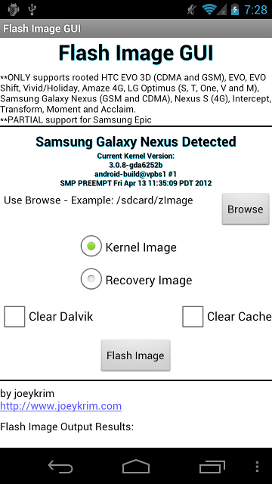 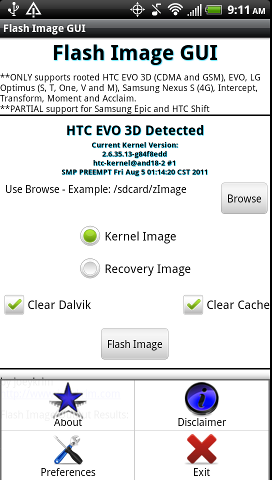 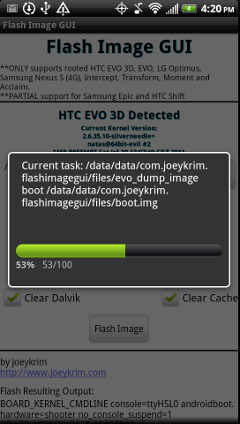 Feedback: Please post any helpful feedback. I'm always looking to improve the application! HTC Unlock - User Guides for Flash Image GUI!! HTC Unlock - Users Guide for ROMs with a Kernel (boot.img file): 1) Unlock using Official HTC method 2) Load this application, Flash Image GUI, onto the device, either through the Market or the link provided in this OP. 3) Download ROM .zip file to the sdcard on the device. 4) Open up Flash Image GUI, select Browse and select the ROM .zip file, downloaded to /sdcard in the previous step. 5) Flash Image GUI will provide a warning, reminding that the ROM .zip file will *need* to be flashed in the custom recovery afterward. 6) Flash Image GUI will index the full ROM .zip file searching for the kernel and kernel modules. Once located, the Flash Image button should be enabled. 7) Select the Flash Image button and Flash Image GUI will load the kernel modules and kernel from inside the ROM zip file. 8) Select reboot recovery. 9) Inside the custom recovery, load/flash the ROM zip file. 10) Reboot to normal Android mode and all should work including Wifi! HTC Unlock - Users Guide for flashing ONLY a Kernel (zip file): 1) Make sure the selected Kernel is compatible with the currently loaded ROM. If not, this will result in a lot of frustration!!! See troubleshooting steps below. 2) Download kernel zip file to /sdcard. 3) Open Flash Image GUI, browse and select kernel zip file, downloaded/loaded to sdcard in previous step. 3) Flash Image GUI will validate the kernel zip file is contains the minimum required files 4) Select the Flash Image button and Flash Image GUI will load the kernel and the kernel modules from the source kernel zip file. 5) Reboot Basic Troubleshooting: Troubleshooting after Rebooting: First step, when experiencing issues flashing is to RE FLASH the files again. Many times, re flashing again will clear up any issues. If not, see the issues/solutions below. Issue #1: If the device hangs or reboots while on the splash screen, the kernel (or packaged ramdisk in the kernel) is NOT compatible with your device!!! Solution for #1: Have to boot into fastboot and load the custom recovery to flash a known good kernel or restore a previously known good nandroid backup. Command: fastboot boot c:\downloads\cwm-recovery.img Issue #2: If the device hangs or reboots while on the boot animation, the ROM is likely NOT compatible with the kernel!!! Solution for #2: Have to boot into fastboot and load the custom recovery to flash a known good ROM/kernel combination either from a zip file or restore from a nandroid backup. http://forum.xda-developers.com/show....php?t=1954121
__________________
|
|
#450
26/10/12, 22:20:53
|
||||
|
||||
|
la teneis en aptoide.......
__________________
|
|
#451
27/10/12, 13:35:14
|
||||
|
||||
|
|
|
#452
27/10/12, 14:04:46
|
||||
|
||||
|
Cita: Originalmente Escrito por danielalonso
por cierto hasta el lunes no hay rom, a lo mejor sorpresa con la milestone..... sera...sera...
__________________
|
|
#453
28/10/12, 10:57:15
|
||||
|
||||
|
|
| Gracias de parte de: | ||
|
#454
28/10/12, 11:00:12
|
||||
|
||||
|
Cita: Originalmente Escrito por regwolf
__________________
|
|
#456
28/10/12, 11:14:26
|
||||
|
||||
|
la jelly bean esta llegando al nuestro en Asia !!!!!!!!
__________________
|
| Gracias de parte de: | ||
|
#459
28/10/12, 11:46:05
|
||||
|
||||
|
|
|
|
|
#460
28/10/12, 11:46:37
|
||||
|
||||
|
Por si os interesa
Enviado desde mi htc One s Villedroid V 1.0
|



![Array
[xs_avatar]](https://avatar.htcmania.com/avatares/avatar369364_6.gif)


![Array
[xs_avatar]](https://avatar.htcmania.com/avatares/unknown.gif)
![Array
[xs_avatar]](https://avatar.htcmania.com/avatares/avatar689649_2.gif)
![Array
[xs_avatar]](https://avatar.htcmania.com/avatares/avatar647525_1.gif)
![Array
[xs_avatar]](https://avatar.htcmania.com/avatares/avatar804902_38.gif)
![Array
[xs_avatar]](https://avatar.htcmania.com/avatares/avatar332188_31.gif)
![Array
[xs_avatar]](https://avatar.htcmania.com/avatares/avatar898927_6.gif)
