 |
|
||
|

|

|
|||||||
| ROMs y desarrollo Samsung Galaxy S III i9300 ROMs y desarrollo Samsung Galaxy S III (modelo i9300) |
 |
|
|
Herramientas |
|
#1
 07/10/12, 04:50:30
|
||||
|
||||
|
[ROM] Codename Android 3.6.6 [JellyBean] [10/04/12]
 Android 3.6.6 [JellyBean] SCREENSHOTS ———   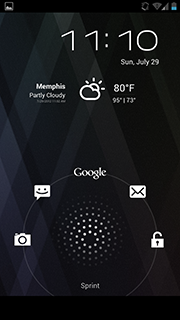 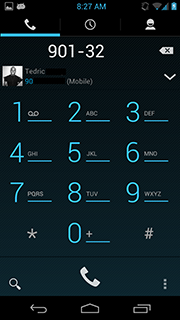   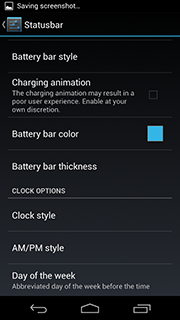 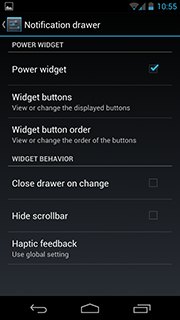 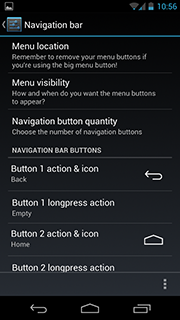  Especificaciones * Based off of Clean Android 4.1.1 Rev6 (JRO03R) * File Manager Included * T-mobile Theme Manager (tmobile, CyanogenMod, xoomdev) * T9 Dialer/Landscape/Dialpad Settings (CyanogenMod) * Trebuchet Custom Launcher (CyanogenMod) * Ability to set custom ringtone delay (in phone settings - Netboy) * Framework: added support for caller name display (kenshin) * Framework: added HSPA+ support (shows H+ icon on status bar when connected to hspa+ - Bajee11) * Framework: ability to set custom carrier label (Netboy) * Browser: option open tab in incognito mode (Arham Jamal) * Browser: option to close all other tabs (Arham Jamal) * Browser: unhid the user agent settings * DeskClock: added stopwatch and countdown timer (Jorge Ruesga) * DeskClock: added settings to do nothing/snooze/dismiss and alarm by flipping the device (maurodec) * DeskClock: you can set an alarm to switch your profile (jorge ruesga) * Email: added meeting time to email invitation tab (erezak) * Email: added option to enable/disable LED notifications per email account (apohl79) * Keyboard: ability to use the volume buttons to move the cursor (romanbb) * Settings: ADB over Network (enable TCP/IP debugging over Network interfaces (WiFi, Usb networks) * Settings: Added option to disable volume adjustment sound (Settings -> Sound - StevenHarper) * Settings: Option to change the devices hostname * Settings: Hardware info in about phone (romanbb) * Settings: Added nfc poling (sethyx) * Custom Camera App: (CyanogenMod) - Continuos focus - Iso Support - Support for red eye reduction - Ability to use the power button to take pictures * Customizable Messaging App: - Added the ability to display a pop-up QuickMessage when an Sms message is received (DvTonder) - Added call sender and quick reply notification actions (DvTonder) - Added Emoji patch from CM MMS app (Robert Burns) - SMS Templates (rciovati) - Custom Vibrations (mssmison) - Timestamp Options (aravance) * Customizable Phone App (CM) - Advanced Phone settings (optional vib on outgoing or incoming call or every 45 seconds) * Customizable Power Menu (codenamedroid) - Reboot Menu - Profile Switcher - Screenshot - Airplane Mode - Navigation bar toggle - Silent toggle * Customizable Status Bar: (Miui, CyanogenMod, romanbb, sethyx, kejar, syaoran12 ,romanbb, Stevespear426, Kyle Teague, Whitehawkx) - Battery Icon style - Battery Icon in notification bar - Miui style battery bar - Clock style - Customizable Clock Color - Clock Am/Pm style - Clock Day of the Week - Customizable Signal Text - Customizable WiFi Signal Text - Ability to slide your finger across the status bar to control brightness - Notification counter * Customizable Notification bar: - Notification bar Power Widget (Cvcps, DvTonder – CyanogenMod) - Notification bar Toogles (AOKP - romanbb) * Customizable Navigation Bar: (Zaphod-Beeblebrox, KhasMek, romanbb, akellar) - Ability to enable/disable the navigation bar (enable toggle in power menu settings) - Customizable navigation button actions - Custom navigation bar ring targets (Team Eos, modified by Codenamedroid) - customizable navigation bar color (Team Eos, modified by Codenamedroid) - Customizable navigation button and button glow color - Menu button visibility and location - Number of navigation buttons - Order of navigation buttons - Navigation bar size - Navigation bar transparency * Customizable Lockscreen: - Up to eight configurable lockscreen targets (Codenamedroid) - Added optional centered lockscreen layout (Codenamedroid) - Optional centered lockscreen clock - Option to disable vibration on the lockscreen (StevenHarper) - Customizable number of lockscreen targets (CyanogenMod) - Configurable lockscreen wallpaper (Danesh M) - Option to always show lockscreen battery (Blunden) - Add weather to the lockscreen (DvTonder, Danesh M, Marius Volkhart, Rick C, Aokp) - Add calendar reminders to the lockscreen (David Morgan) - Lockscreen before secure unlock (Danesh M) - Ability to unlock with menu (CyanogenMod) - Quick pin unlock (unlock with pin/password without pressing ok – CyanogenMod) * Customizable Sound Settings: - Customizable volume panel (Stevespear426) - Configurable ascending ringtone (Danny Baumann) - Safe headset volume (CyanogenMod) - Volume rocker music controls (CyanogenMod) - Ability to customize action taken when connecting a headset (syaoran12) - Face down actions (syaoran12) * Customizable Display Settings: (CyanogenMod) - Customizable Rotation Modes - Customizable LED Pulse (Duration and Color) - Volume wake (tap either the up or down volume key to wake your phone from sleep) - Volume music controls (long press volume buttons to skip tracks) * Custom Profiles (CyanogenMod) - assign different profiles to change the behavior of your phone to your liking * Quiet Hours (CyanogenMod) - the ability to set when notification sounds, haptic feedback, vibration and notification light will function[/color] * Performance Settings: - Start-up tweaks (kejar, Jrummy) - Processor Speed (xoomdev) - Voltage controls (xoomdev) - Kernel controls (kejar, Jrummy) * Developer Options: - Propmodder (Jdkoreclipse) - Spare Parts - Development app - Testing Settings EXTRA TOOLS ——— * SuperSU * Busybox * Bash * Nano Hilo Oficial XDA Codename Android Webstie Codename Android Twitter Descarga: ROM Descarga: Google Apps Link Donacion: Codename Android ( Se agradecen donaciones para mantener las proximas roms  ) )Codename Android 3.6.5 – 3.6.6 Changelog ——— [additions] * enables custom navigation bar keys and ring on 10inch tablets (Stevespear426) * added the option to change the soft keyboard type when composing messages (GzFighter): Gives the user the option to change the keyboard from Emoji to enter or a new line or enter to send. The setting has no effect on the hardware keyboard. * increased the default number of sms messages sent in checking period (TeamBAMF) * added screenshot option to navbar settings (Stevespear426) [general] * updated navbar color picker (Patrick L) [fixes] * fixed audio wakelock on galaxy s3 * fixed reverting to 700mhz on screen on galaxy nexus * fixed QuickMessage popup force closing when receiveing Mms and QuickMessage themeing support * fixed switching custom navbar icons without resetting the navbar Codename Android 3.6.0 – 3.6.5 Changelog ——— [additions] * new Codename(Android) wallpapers - (Codenamedroid, LordGarlicbeard, Paranoid Android) * custom navbar icons - (Zaphod-Beeblebrox, modified to work with CNA) * notification wallpaper - (xoomdev, modified to work with CNA) * statusbar transparency - (Paranoid Android) * re-added navbar color * added force tablet and dpi change (dagr8 - Settings -> Interface -> Gerneral UI) * added alternate signal layout (Zaphod-Beeblebrox - Settings -> Interface -> Status bar) * added IME switcher and Ring/Vibe toggle as navring target (Boris Bershadskiy) * added IME toggler as Navbar target (Boris Bershadskiy) * increased themeability of the statusbar (Zaphod-Beeblebrox) * added the advanced calulator features from cm * add alow mock sms to developer settings (jruesga) * new command line tools: htop, lsof, powertop, nano, vim [translations] korean translations (franco-c) czech translation (Kynio89)
__________________

Última edición por Menn Día 07/10/12 a las 11:22:31. 
|
|
|
|
#2
07/10/12, 04:54:23
|
||||
|
||||
|
La llevo solo unas 2 horas y he de decir que es la mejor rom que he probado,por fluidez y personalizacion,toda una gozada,veremos que tal consumo tiene.
__________________
|
|
#4
07/10/12, 05:13:51
|
||||
|
||||
 Cita: Originalmente Escrito por diavliyo Cita: Originalmente Escrito por diavliyo

Hay temas disponibles para esta rom, gracias
Enviado desde mi GT-I9300 usando Tapatalk 2  Si claro,los mismas que para las CM10,CM9,AOKP te dejo un links con un monton http://forum.xda-developers.com/show....php?t=1716881
__________________
Última edición por Menn Día 07/10/12 a las 05:17:07.
|
| Gracias de parte de: | ||
|
#5
07/10/12, 09:36:03
|
||||
|
||||
|
Estoy pr flashear esta rom.. solo una cosa :
Como cambio las opciones de lo que quiero que me salgo o no en la pantalla de bloqueo ?
__________________
|
|
#6
07/10/12, 09:40:16
|
||||
|
||||
|
Cita: Originalmente Escrito por Gochi2008
Estoy pr flashear esta rom.. solo una cosa :
Como cambio las opciones de lo que quiero que me salgo o no en la pantalla de bloqueo ?
__________________
Última edición por Menn Día 07/10/12 a las 10:00:25.
|
|
#7
07/10/12, 10:12:31
|
||||
|
||||
|
Cita: Originalmente Escrito por Menn
En ajustes/interface/bloqueo de pantalla/accesos directos
Debe habe algun modo...
__________________
|
|
#8
07/10/12, 10:24:13
|
||||
|
||||
|
Buenas,
En los pantallazos salen los botones en la pantalla, entiendo que éstos son de otro terminal, ya que el nuestro lleva botones físicos. ¿No? Gracias por tu aporte.
__________________
"Hazlo, o no lo hagas. Pero no lo intentes"
|
|
#9
07/10/12, 10:26:19
|
||||
|
||||
|
Cita: Originalmente Escrito por drizt88
Buenas,
En los pantallazos salen los botones en la pantalla, entiendo que éstos son de otro terminal, ya que el nuestro lleva botones físicos. ¿No? Gracias por tu aporte. 
__________________
|
|
#10
07/10/12, 10:33:38
|
||||
|
||||
|
Cita: Originalmente Escrito por Gochi2008
En el S2 existia un mod para esos botones
Bueno yo me refiero a que a mi no me gusta tener los botones, antes llevaba el Nexus y los llevaba con el menor dpi posible. Mi pregunta es más bien al contrario...¿Se pueden quitar esos botones?  Perdón si no me he explicado muy bien 
__________________
"Hazlo, o no lo hagas. Pero no lo intentes"
|
|
#11
07/10/12, 10:35:20
|
||||
|
||||
|
Cita: Originalmente Escrito por drizt88
Hola!
Bueno yo me refiero a que a mi no me gusta tener los botones, antes llevaba el Nexus y los llevaba con el menor dpi posible. Mi pregunta es más bien al contrario...¿Se pueden quitar esos botones? Perdón si no me he explicado muy bien
__________________
|
| Gracias de parte de: | ||
|
#12
07/10/12, 10:41:25
|
||||
|
||||
|
Entro en descarga de rom pero veo varias ocasiones, cual es? Y la descarga de Google apps se supone que son aplicaciones que han quitado y quieres meter, no?
__________________
es mas facil cambiar el curso de un rio que el caracter de un hombre
|
|
#13
07/10/12, 10:41:34
|
||||
|
||||
|
Visto en su foro :
LED problem not fixed WIFI tethering doesnt work De momento no la flasheo, si a eso le sumas que no veo como quitar los botones de abajo del todo... voy a esperarme con la checkrom v5.5
__________________
|
|
#14
07/10/12, 10:42:23
|
||||
|
||||
|
Cita: Originalmente Escrito por f.g.m.
Entro en descarga de rom pero veo varias ocasiones, cual es? Y la descarga de Google apps se supone que son aplicaciones que han quitado y quieres meter, no?
__________________
|
|
#15
07/10/12, 10:51:16
|
||||
|
||||
|
@menn :
tu que ya la has instalado, podrias contarnos algo sobre lo del led y si funciona wifi corectamente ? y si no es mucho pedir, hay modo de quitar los botones del nexus de la barra inferior ? Gracias !
__________________
|
|
#16
07/10/12, 11:25:33
|
||||
|
||||
|
Cita: Originalmente Escrito por Gochi2008
Si, eso es lo que creia, pero parece que las opciones que comentas se refieren a la pantalla de bloqueo stock, no a la aosp que parece montar esta rom.
Debe habe algun modo... Yo lo he cambiado donde te he comentado si quieres te mando una captura
__________________
|
|
#17
07/10/12, 11:26:53
|
||||
|
||||
|
Cita: Originalmente Escrito por drizt88
Buenas,
En los pantallazos salen los botones en la pantalla, entiendo que éstos son de otro terminal, ya que el nuestro lleva botones físicos. ¿No? Gracias por tu aporte. Asi es,por defecto viene sin ellos aunque en las opciones se los puedes poner si quieres
__________________
|
|
#18
07/10/12, 11:29:52
|
||||
|
||||
|
Cita: Originalmente Escrito por f.g.m.
Entro en descarga de rom pero veo varias ocasiones, cual es? Y la descarga de Google apps se supone que son aplicaciones que han quitado y quieres meter, no?
Descarga: ROM tu que ya la has instalado, podrias contarnos algo sobre lo del led y si funciona wifi corectamente ? y si no es mucho pedir, hay modo de quitar los botones del nexus de la barra inferior ? Gracias ! ________ Yo uso una app para el led llamada Lightflow y me va de lujo,el wifi funciona perfectamente y los botones no vienen puestos por defecto
__________________
Última edición por Menn Día 07/10/12 a las 11:34:25.
|
| Gracias de parte de: | ||
|
#20
07/10/12, 12:42:21
|
||||
|
||||
|
Cita: Originalmente Escrito por Gochi2008
Y sin lightflow funciona el led ?
Como se comporta la beteria ? Llevo casi 11 horas con ella y 2h depantalla y me queda 30% de bateria,no es una valoracion correcta por que he flasheado kernels y reiniciado muchas veces,si el led de notificacion funciona.
__________________
|
|
 Estás aquí
|
||||||
|
||||||


![Array
[xs_avatar]](https://avatar.htcmania.com/avatares/avatar348584_2.gif)

![Array
[xs_avatar]](https://avatar.htcmania.com/avatares/avatar240258_2.gif)
![Array
[xs_avatar]](https://avatar.htcmania.com/avatares/unknown.gif)
 Pasate por
![Array
[xs_avatar]](https://avatar.htcmania.com/avatares/avatar25579_1.gif)
![Array
[xs_avatar]](https://avatar.htcmania.com/avatares/avatar413306_3.gif)