 |
|
||
|
#201
 03/06/11, 16:41:41
|
||||
|
||||
 Cita: Originalmente Escrito por fran Cita: Originalmente Escrito por fran

uffffff....la primera en la frente
ASEGURATE DE HABER FLASEADO EL KERNEL CF-ROOT, DEBE APARECER EN APLICACIONES CWM MANAGER 1º paso y no entiendo nada........no os molesteis, seguire estudiando  ...no quiero molestar mucho ...no quiero molestar mucho por aquí por aquíEste hilo es muy buen comienzo....a falta de los lumbreras que se involucren  ...está un pelin dormido ...está un pelin dormidohttp://www.htcmania.com/showthread.php?t=221030  Cita: Originalmente Escrito por vauss Cita: Originalmente Escrito por vauss
Con esto que he dicho ya deberias tener bastante....
si es igual que el kerner para roterar... sacado del post para rotear:
Cita: Originalmente Escrito por deeelite
TRADUCCION Y UNA PEQUEÑA GUIA DE INSTALACION HECHA POR EL COMPAÑERO @vauss para quitar triangulito de advertencia
TRADUCCION CASERA (1) Make sure you have CF-Root flashed (see the first post). You must have the "CWM Manager" app available. ASEGURATE DE HABER FLASEADO EL KERNEL CF-ROOT, DEBE APARECER EN APLICACIONES CWM MANAGER (2) Make sure you have the same version of CF-Root extracted until you have the zImage file. (ZIP --> extract --> TAR --> extract --> zImage). EXTRAE EL KERNEL DEL CF ROOT, ES EL ARCHIVO ZIMAGE QUE HAY DENTRO DEL TAR QUE HAY DENTRO DEL ZIP (3) Push the zImage file to /sdcard . It must still be called zImage ! PONLO EN LA SD, EN LA RAIZ PARA NO PERDELO QUE VOLVEREMOS A EL MAS TARDE (4) Find an original Samsung signed stock kernel (preferably from the same stock firmware you have, but it's not terribly important) POR OTRO LADO, BUSCATE EL KERNEL ORIGINAL DE SAMSUNG, A SER POSIBLE LA MISMA NUMERACION QUE EL CF-ROOT QUE HAYAS FLASEADO Descargar el stock kernel y descomprimirlo: XWKE7 Stock Kernel: http://www.multiupload.com/HMN4GUKBPS md5: 3BC006663F23432D2219DFA45D7AAD13 Password is: intratech@XDA (5) Reboot into download mode (adb reboot download, or boot the device with home and volume-down pressed) REINICIA EN MODO DOWLOAD (6) Fire up ODIN, and flash the Samsung kernel FLASEALO CON ODIN (7) Boot the device with the stock kernel. CWM Manager will still be available. ARRANCA EL TELEFONO DE NUEVO, EL CWM MANAGER DEBE SEGUIR DENTRO DE APLICACIONES (8) Start CWM Manager, select Flash Kernel, and select the zImage from CF-Root you previously put on your SD-card. The kernel will flash and the device will reboot. INICIA EL CWM MANAGER Y ELIJE FLASH KERNEL, FLASEA EL KERNEL QUE HAS METIDO EN EN LA SD (ESTE ES EL QUE HAS EXTRAIDO DEL PAQUETE Y DEBE SER EL CF-ROOT) (9) You will now notice you no longer have the warning triangle during boot, but you are actually running CF-Root with all it's goodies! UNA VEZ FLASEADO YA NO TIENES QUE VER EL TRIANGULO (10) In the future, if you only use the Flash Kernel option inside CWM Manager instead of ODIN, the triangle will not return, neither will your flash counter increase. But keep in mind, that CWM Manager can only handle a direct "zImage" if you are NOT running a kernel with full busybox support (this is currently needed for flashing kernels out of .TAR and .ZIP files) A PARTIR DE AHORA PROCURA FLASEAR LOS KERNELS DESDE EL CWM MANAGER DEJANDO DE LADO ODIN Y EL TRIANGULO NO APARECERA AUNQUE EL CONTADOR DE FLASEOS NO AUTORIZADOS POR SAMSUNG SEGUIRA CONTANDO. LOS KERNELS NO CF-ROOT DEBERAN SOPORTA BUSYBOX PARA PODER SEGUIR FLASEANDO POSTERIORES KERNELS DESDE CWM MANAGER, ES INDISPENSABLE PARA ELLO A grandes rasgos es esto... Última edición por sombraxxl Día 03/06/11 a las 16:50:45. 
|
| Gracias de parte de: | ||
|
|
|
#202
03/06/11, 16:49:02
|
||||
|
||||
|
Acabaramos...ese tutorial seguí yo al completo (el de Vauss)...pero como no leí nada del CWM no sabia si lo tenia...osea que actualmente tengo...KE7+ CF-Root+ CWM?...estoy en lo cierto?
Tengo als espaldas cubiertas para cacharrear rooms?
__________________
 Soy un Beta infiltrao.... 
|
|
#203
03/06/11, 16:58:01
|
||||
|
||||
|
Cita: Originalmente Escrito por fran
Acabaramos...ese tutorial seguí yo al completo (el de Vauss)...pero como no leí nada del CWM no sabia si lo tenia...osea que actualmente tengo...KE7+ CF-Root+ CWM?...estoy en lo cierto?
Tengo als espaldas cubiertas para cacharrear rooms? si lo tienes tienes el CWM y puedes acceder desde esa apli, desde alli mismo puedes acceder al CWM recovery de toda la vida, y hacer backup/restores desde la misma apli, instalar kernel, aplis, etc...  
Última edición por sombraxxl Día 03/06/11 a las 17:07:39.
|
| Gracias de parte de: | ||
|
#205
03/06/11, 17:12:12
|
||||
|
||||
|
Pues no, no tengo el CWM(tuerca en aplis)........y te aseguro que hice el tutorial de Vauss al dedillo....soy root que era lo accesorio.
__________________
Soy un Beta infiltrao....
|
|
#206
03/06/11, 17:14:02
|
||||
|
||||
|
Cita: Originalmente Escrito por fran
Pues no, no tengo el CWM(tuerca en aplis)........y te aseguro que hice el tutorial de Vauss al dedillo....soy root que era lo accesorio.
Volumen (+) + Home + Encender manten pulsado esa combinacion hasta que salga algo y nos dices que te pone arriba el todo. saludos
__________________
Gogua SM-G935F
|
|
#207
03/06/11, 17:19:40
|
||||
|
||||
|
voy.....
gogua acabo de pasrale tu tutorial del cerberus a un compi por MP
__________________
Soy un Beta infiltrao....
|
|
#208
03/06/11, 17:19:59
|
||||
|
||||
|
con instalar esta rom, tienes root, y la tuerca del CWM, lo sé porque yo lo tenía stock y después de un pequeño fallo... particione la memoria interna del teléfono...
 lo conseguí y tengo eso... root +cwm lo conseguí y tengo eso... root +cwm
|
|
#209
03/06/11, 17:22:39
|
||||
|
||||
|
4 opciones en azul
reboot system now apply update from sdcard wipe data/factory reset wipe/cache partition
__________________
Soy un Beta infiltrao....
|
|
#210
03/06/11, 17:23:30
|
||||
|
||||
|
Cita: Originalmente Escrito por fran
voy.....
gogua acabo de pasrale tu tutorial del cerberus a un compi por MP  Bueno, dinos si te sale algo con el arranque que te he dicho ?? saludos
__________________
Gogua SM-G935F
|
|
#211
03/06/11, 17:24:25
|
||||
|
||||
|
Cita: Originalmente Escrito por fran
4 opciones en azul
reboot system now apply update from sdcard wipe data/factory reset wipe/cache partition Tendrás que realizar su tutorial, el CF-root Tiene que salirte algo asi, pero con un 5 al final de la version. 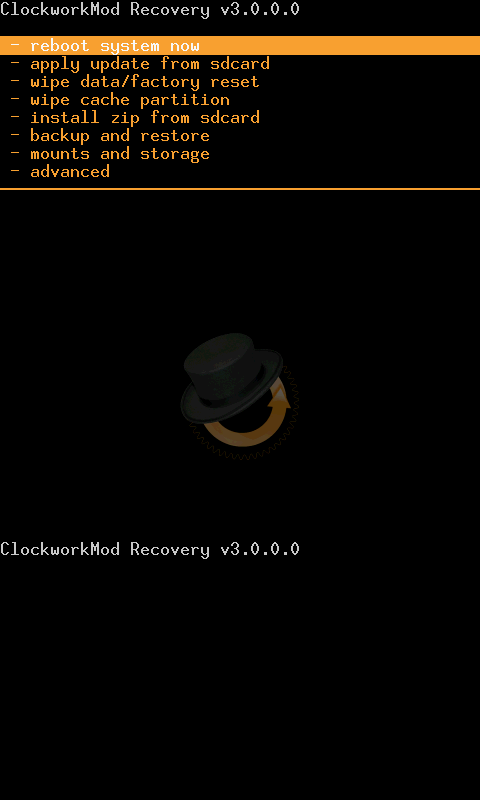 saludos
__________________
Gogua SM-G935F
Última edición por gogua Día 03/06/11 a las 17:26:33.
|
|
#212
03/06/11, 17:31:57
|
||||
|
||||
|
Sabia yo que faltandome la palabra magica "backup" no podia ser.
Esta noche me pongo. Espero que no andeis muy lejos En definitiva es realizar el tuto de eeelite verdad? Digamos que yo tengo la mitad (Vauss) y me falta la otra...cierto?
__________________
Soy un Beta infiltrao....
|
|
#213
03/06/11, 17:36:35
|
||||
|
||||
|
Ademas cuando lo tengas, en mounts and storage, podras montar el usb y enchufarlo al pc desde el recovery y ver el almacenamiento interno para meter ahi los backups que hayas hecho y copiado al pc, por ejemplo
saludos
__________________
Gogua SM-G935F
|
|
#214
03/06/11, 17:37:36
|
||||
|
||||
|
Cita: Originalmente Escrito por fran
Sabia yo que faltandome la palabra magica "backup" no podia ser.
Esta noche me pongo. Espero que no andeis muy lejos En definitiva es realizar el tuto de eeelite verdad? Digamos que yo tengo la mitad (Vauss) y me falta la otra...cierto?
|
|
#215
03/06/11, 17:49:19
|
||||
|
||||
|
Lo que digo...a partir de deeelite porque lo otro ya lo tengo...verdad?
Es que el 201 tiene los dos Vauss + deelite Gracias por vuestra paciencia majos
__________________
Soy un Beta infiltrao....
|
|
#216
03/06/11, 18:01:22
|
||||
|
||||
|
Cita: Originalmente Escrito por fran
Lo que digo...a partir de deeelite porque lo otro ya lo tengo...verdad?
Es que el 201 tiene los dos Vauss + deelite Gracias por vuestra paciencia majos
|
|
#217
03/06/11, 18:43:38
|
||||
|
||||
|
Cita: Originalmente Escrito por sombraxxl
yo empezaria de cero en el orden que te lo he puesto vauss + deelite
Gracias Saludos
__________________
Soy un Beta infiltrao....
|
|
#218
03/06/11, 20:41:09
|
||||
|
||||
|
Dos preguntas de novato pero como somos muchos y es de las primeras ROMS a ver si así nos enteramos todos:
- Con las roms cocinadas ¿funciona el kies? para mi es necesario para poder trabajar, no hay nada que sincronice bien outlook y adroid salvo este. - Acabo de instalar el Rom MAnager 4.3.1.3. Para hacer una copia de seg de la ROM me pide descargar el CWM pero me dice que mi dispositivo es el GT 9000. Elijo este no dará problemas? Gracias.
__________________
Feliz dia ... y mejor noche!!!

|
|
#219
03/06/11, 22:48:03
|
||||
|
||||
|
No lo entiendo, yo instalé esta rom con el teléfono DE TIENDA, VIRGEN. Actualizó a 7, me dio acceso root e instalo el custom recovery.
Vamos, me ha venido todo junto. Simplemente los wipes y le pasé el Odin.
|
|
|
|
#220
03/06/11, 23:00:15
|
||||
|
||||
|
Cita: Originalmente Escrito por alexiscarrascom
No lo entiendo, yo instalé esta rom con el teléfono DE TIENDA, VIRGEN. Actualizó a 7, me dio acceso root e instalo el custom recovery.
Vamos, me ha venido todo junto. Simplemente los wipes y le pasé el Odin. yo tb desde esta mñn llevo 7 flasheos dice el contador siempre de la misma haciendo pruebas
|



![Array
[xs_avatar]](https://avatar.htcmania.com/avatares/avatar94070_93.gif)

![Array
[xs_avatar]](https://avatar.htcmania.com/avatares/avatar368_1.gif)
![Array
[xs_avatar]](https://avatar.htcmania.com/avatares/unknown.gif)
![Array
[xs_avatar]](https://avatar.htcmania.com/avatares/avatar94925_1.gif)
