 |
|
||
|
#161
 19/08/14, 09:02:04
|
||||
|
||||
 Cita: Originalmente Escrito por totoro21 Cita: Originalmente Escrito por totoro21

Si, la verdad que lo llevo a cuestas, "cuestas parriba" ,"cuestas pabajo". Tu solo lo llevas por lo llano?
  Pues claro no pensarás que cargue con 165 gramos cuesta arriba estamos locos???? 
|
|
|
|
#162
19/08/14, 14:53:08
|
||||
|
||||
|
Cita: Originalmente Escrito por fernando28
Pues claro no pensarás que cargue con 165 gramos cuesta arriba estamos locos????

|
|
#163
19/08/14, 21:55:20
|
||||
|
||||
|
He visto una aplicacion nueva en la wear store, snapzy , puedes utilizarla como cobtrol remoto de la camara de fotos pero tambien puedes ver en el reloj lo que ve la camara del movil y si agitas el reloj saca una foto.
|
|
#164
20/08/14, 08:54:11
|
||||
|
||||
|
Alguien sabe si hay alguna app para utilizar el reloj de mando a distancia? Como la quick remote pero para el g watch
|
|
#166
20/08/14, 15:57:33
|
||||
|
||||
|
Cita: Originalmente Escrito por zell_sarda
Alguien sabe si hay alguna app para utilizar el reloj de mando a distancia? Como la quick remote pero para el g watch
|
|
#169
20/08/14, 20:27:04
|
||||
|
||||
|
Cita: Originalmente Escrito por eriik24
Yo debo ser el unico que por mas que busca por el foro no ve como se instala una aplicacion en el reloj... alguien podria informarme??
2º. instalar aplicacion en el movil del play store "wear store" 3ª te bajas de la wear store las aplicaciones que quieras al movil y ya te aparecen directamente en el reloj, si hay alguna que no te sale; en configuración de la aplicación "android Wear" en el movil le das a "volver a sincronizar aplicaciones". El movil y el reloj tienen que estar conectados por bluethoot. Saludos
|
|
#170
20/08/14, 20:41:24
|
||||
|
||||
|
Cita: Originalmente Escrito por jaa45
1º. bajar aplicación en el movil de la play store " android wear"
2º. instalar aplicacion en el movil del play store "wear store" 3ª te bajas de la wear store las aplicaciones que quieras al movil y ya te aparecen directamente en el reloj, si hay alguna que no te sale; en configuración de la aplicación "android Wear" en el movil le das a "volver a sincronizar aplicaciones". El movil y el reloj tienen que estar conectados por bluethoot. Saludos
|
|
#171
20/08/14, 20:45:58
|
||||
|
||||
|
Cita: Originalmente Escrito por eriik24
Pues yo hago esto que comentas.. me descargo la aplicacion pero no me sale en el reloj... supongo que las aplicaciones se abren en la opcion "iniciar" verdad??
|
|
#172
20/08/14, 20:57:32
|
||||
|
||||
|
Cita: Originalmente Escrito por LocoAbreu
Descarga wear mini launcher, mucho mas facil para iniciar las aplixaciones a ver si asi te salen.
como se accede a las aplicaciones en el reloj??
|
|
#174
20/08/14, 21:34:32
|
||||
|
||||
|
Cita: Originalmente Escrito por LocoAbreu
En iniciar donde tu dices deberian aparecer todas
|
|
#175
21/08/14, 09:09:35
|
||||
|
||||
|
Una pasada, un mini launcher con más características como controlar la música, volúmen, encontrar el teléfono...:
Características: • 3 different style app launchers • Floating Launcher - Open the launcher with a single tap on the floating icon. Move around the floating icon at your will. • Radial Launcher - Moto 360 Style launcher • Swipe Launcher - Traditional phone style launcher • Multitasker / Recent App switcher - Switch between running apps any where on the Android wear system (Multitasking) • Phone Finder - Get notified on your watch, when you are away from your phone. • Wifi Tethering • Music Controller - Control your Google Play Music Player on your phone right from your watch. • Wifi & Phone Profile Toggles on watch • Screen Always On • RAM monitor • Changing Phone volume from watch • Phone & watch battery levels • Quick Settings - Easily change brightness, volume profile & view smart watch battery level. https://play.google.com/store/apps/d....swipify.phone 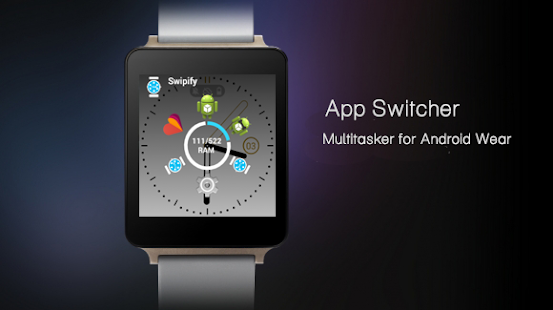 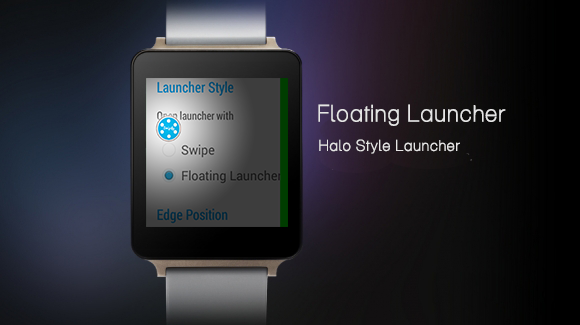 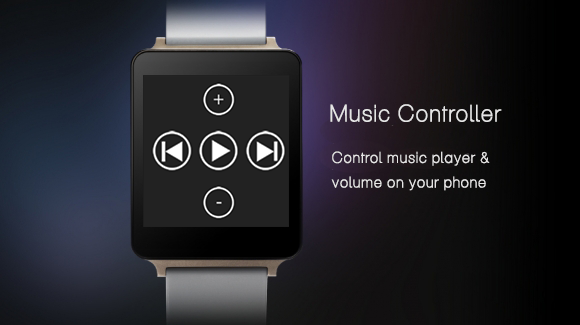 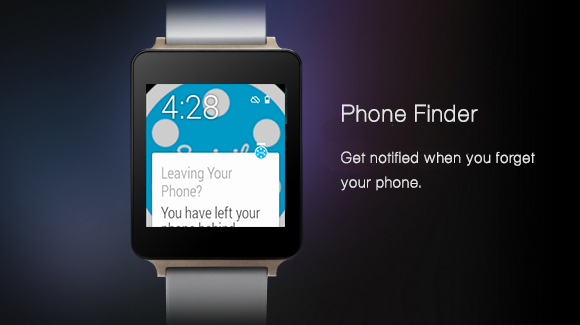
Última edición por VENABLES Día 21/08/14 a las 09:33:32.
|
| Los siguientes 5 usuarios han agradecido a VENABLES su comentario: | ||
|
#179
21/08/14, 12:08:25
|
||||
|
||||
|
Cita: Originalmente Escrito por VENABLES
Una pasada, un mini launcher con más características como controlar la música, volúmen, encontrar el teléfono...:
Características: • 3 different style app launchers • Floating Launcher - Open the launcher with a single tap on the floating icon. Move around the floating icon at your will. • Radial Launcher - Moto 360 Style launcher • Swipe Launcher - Traditional phone style launcher • Multitasker / Recent App switcher - Switch between running apps any where on the Android wear system (Multitasking) • Phone Finder - Get notified on your watch, when you are away from your phone. • Wifi Tethering • Music Controller - Control your Google Play Music Player on your phone right from your watch. • Wifi & Phone Profile Toggles on watch • Screen Always On • RAM monitor • Changing Phone volume from watch • Phone & watch battery levels • Quick Settings - Easily change brightness, volume profile & view smart watch battery level. https://play.google.com/store/apps/d....swipify.phone
|
|
|
|
#180
21/08/14, 12:12:31
|
||||
|
||||
|
Cita: Originalmente Escrito por moesh
Y como las hago funcionar en el reloj?
|



![Array
[xs_avatar]](https://avatar.htcmania.com/avatares/avatar16181_7.gif)


![Array
[xs_avatar]](https://avatar.htcmania.com/avatares/avatar621133_1.gif)

![Array
[xs_avatar]](https://avatar.htcmania.com/avatares/avatar483873_1.gif)
![Array
[xs_avatar]](https://avatar.htcmania.com/avatares/unknown.gif)
![Array
[xs_avatar]](https://avatar.htcmania.com/avatares/avatar120977_1.gif)
![Array
[xs_avatar]](https://avatar.htcmania.com/avatares/avatar812168_1.gif)
![Array
[xs_avatar]](https://avatar.htcmania.com/avatares/avatar275312_1.gif)
![Array
[xs_avatar]](https://avatar.htcmania.com/avatares/avatar608420_1.gif)
