 |
|
||
|
#1
 18/10/11, 18:45:30
|
||||
|
||||
|
Android Market 3.2.0
Aqui teneis la nueva version del Market. Va mucho mejor que la anterior.
http://forum.xda-developers.com/atta...9&d=1318488285 Procedure to install via CWM Recovery According to popular requests, I made a flashable version of the new Market 3.2.0. This will solve all the installation issues. 1. Flashable zip file here. 2. Do a Nandroid Backup. 3. Reboot into Recovery & Flash the zip. 4. Now reboot & enjoy.......  Procedure to install via Root Explorer Method 1. Download the apk file from the attachment to your sd card. 2. Now using Root explorer, go to /system/app 3. Mount the system to r/w. 4. Now search for Vending.apk & rename it to Vending.apk1 5. Copy the file you just downloded to /system/app 6. Now press & hold the app and select Permissions 7. Select only the options given below. Now REBOOT & enjoy.....  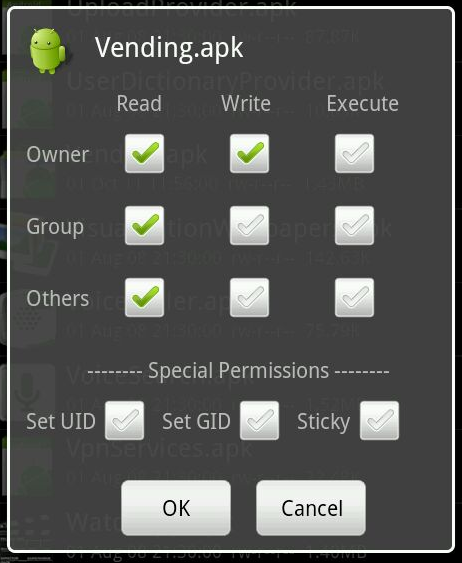 Saludos Javier Última edición por Dubdub Día 18/10/11 a las 18:49:04. Razón: Procedure 
|
|
|



![Array
[xs_avatar]](https://avatar.htcmania.com/avatares/unknown.gif)

