 |
|
||
|

|

|
|||||||
| ROMs y desarrollo OnePlus 2 ROMs y desarrollo OnePlus 2 |
 |
|
|
Herramientas |
|
#1
 15/04/16, 21:32:12
|
||||
|
||||
|
[6.0] [ROM] [OOS Based] CyanOxy OS [06/04]
Pongo por aqui esta Rom, la cual llevo ya un par de días y para mí hasta la fecha ha sido la que mejor me ha resultado.
El cocinero ha ido adaptando algunas peticiones de los usuarios, y como no, ya sabemos que el punto flaco de la OOS 3.0 es el sonido, y le ha incorporado el V4A, el cual solamente tienes que cambiar el SElinux a permisivo para que funcione, y vaya si funciona. Enlace al hilo de la rom: http://forum.xda-developers.com/onep...xy-os-t3340943 Caracteristicas y descripcion: PLEASE READ ALL THE THREE POSTS BEFORE YOU FLASH THIS CyanOxy OS is a unique combination of Cyanogenmod and Cyanogen OS apps with an Oxygen OS base which enhances speed, utility and aesthetics. Optimized for stability and fluidity, it provides a smoother and richer experience than stock OOS. The CM apps only make it better providing enhanced functionality. I built this ROM primarily for my own use, since I love the Cyanogenmod apps but I always end up going back to Oxygen after a few weeks of staying on CM. Features: -Based on the latest Oxygen OS -Fully debloated (list of removed apps are in post 3) -Pre rooted and busybox installed -Deodexed -Zipaligned -Viper4Android (thanks to ViPER520) -No need to flash Gapps, the important ones are pre-installed -Fully functional Trebuchet launcher -DPI set to 360 -Build.prop tweaks for better battery life, performance and networking. Cyanogenmod and Cyanogen OS apps: -File Manager -Trebuchet -Browser -Music Player -LockClock -Boxer Email -Boxer Calendar -Screencast -Sound Recorder -CM Gallery Installation instructions FOR V1.0 -Wipe system, data, cache and dalvik using TWRP -Flash the OOS 2.2.1 Stock ROM zip, followed by CyanOxy OS v1.0 -Reboot -Do NOT select Swiftkey during the set up (since I've removed the app. You can install it from the play store later.) -If your installer gets stuck at "Checking connection", go back, reconnect to your WiFi and then continue. INSTALLATION FOR V2.0 ONWARDS FOLLOW THESE INSTRUCTIONS CAREFULLY OR ELSE YOU WILL END UP WITH A SOFT BRICKED DEVICE. -Wipe data, cache, system, dalvik from TWRP -Flash stock OOS 3.0 Beta (http://downloads.oneplus.net/2016-03...enOS_3.0_Beta). DO NOT REBOOT. -Flash modified recovery img (https://www.androidfilehost.com/?fid=24459283995297945) -Reboot into recovery from TWRP -Wipe data, cache, dalvik AGAIN and then flash stock OOS 3.0 Beta AGAIN -Flash CyanOxy OS 2.x Beta zip -Reboot -Select Trebuchet as default launcher (If you want to use Oneplus Launcher, you will have to delete the trebuchet folder from system/priv-app with the twrp file manager and then reboot. If you're coming from v2.0 you can dirty flash v2.2. TO USE V4A, GIVE ROOT PERMISSIONS TO SELINUX CHANGER AND CHANGE IT TO PERMISSIVE. THEN OPEN V4A, INSTALL THE DRIVER, REBOOT. (Thank you @MrBIMC for the SELinuxModeChanger app) Recommended but not compulsory: Flash the latest Boeffla Kernel by @Lord Boeffla (http://forum.xda-developers.com/onep...-2015-t3218164). You could also use the uber and linaro builds made by @ZaneZam (http://forum.xda-developers.com/onep...-uber-t3218452) Changelog: -v1.0: Initial Release, based on OOS 2.2.1 -v2.0 Beta: Updated to OOS 3.0, removed snapdragon camera -v2.1 Beta: (Removed due to root issues) v2.2 Beta: Replaced GalleryNext with CMGallery, added v4a, more build.prop tweaks, Cyanogen OS bootanimation, removed the annoying screenshot sound, updated Busybox. Downloads: v1.0 and v2.0 https://mega.nz/#F!D8sDna6K!uV7Nwrp9GqW_hgpHT05j4g v2.0 Mirror (Thank you @GhostSamuraiX) https://drive.google.com/file/d/0Byn...83UTc4SEk/view v2.2 onwards: https://www.androidfilehost.com/?w=files&flid=53534 CyanOxy Telegram group (thank you @GhostSamuraiX) https://telegram.me/CyanOxy XDA  evDB Information evDB InformationCyanOxy OS, ROM for the OnePlus 2 Contributors zoroarctic ROM OS Version: 6.0.x Marshmallow Version Information Status: Stable Current Stable Version: 1.0 Stable Release Date: 2016-03-20 Current Beta Version: 2.2 Beta Release Date: 2016-04-06 Created 2016-03-20 Last Updated 2016-04-05 Lleva el DPI a 360, al principio choca, pero luego te acostumbras y a mi al menos me gusta bastante. Muy fluida, y de momento no le encuentro ningun fallo. 
|
| Los siguientes 6 usuarios han agradecido a mikelange su comentario: | ||
|
|
|
#4
16/04/16, 10:23:48
|
||||
|
||||
|
Llevo con ella unas 2 semanas sin ninguna queja.He subido los DPI a 460 en el build.prop sin problemas
***TAPATALKING***
__________________
...AND JUSTICE FOR ALL...
Última edición por stani Día 16/04/16 a las 10:30:28.
|
|
#7
17/04/16, 09:26:37
|
||||
|
||||
 Cita: Originalmente Escrito por cetesalinas Cita: Originalmente Escrito por cetesalinas

Y de tragona??
  Hoy el día lo paso entero seguro...  Enviado desde mi OPT Última edición por mikelange Día 17/04/16 a las 09:29:33.
|
|
#8
17/04/16, 13:11:06
|
||||
|
||||
|
buenas, soy un poco nuevo en esto, y me gustaria meter esta rom ya que veo que la poneis muy bien, tengo el movil de fabrica.
que version le tengo que meter? la V1 v2? muchas gracias
|
|
#9
17/04/16, 13:32:06
|
||||
|
||||
|
Cita: Originalmente Escrito por ertt
buenas, soy un poco nuevo en esto, y me gustaria meter esta rom ya que veo que la poneis muy bien, tengo el movil de fabrica.
que version le tengo que meter? la V1 v2? muchas gracias  ***TAPATALKING***
__________________
...AND JUSTICE FOR ALL...
|
| Gracias de parte de: | ||
|
#12
17/04/16, 20:02:15
|
||||
|
||||
|
Cita: Originalmente Escrito por tifonnete
Se puede usar este kernel [CM13] Boeffla-Kernel 5.0-alpha8 (11-04-2016) en esta rom???
Es que no se si la rom es oxi o CM Enviado desde mi ONE A2003 mediante Tapatalk
|
|
#17
17/04/16, 21:31:46
|
||||
|
||||
|
Cita: Originalmente Escrito por stani
***TAPATALKING*** 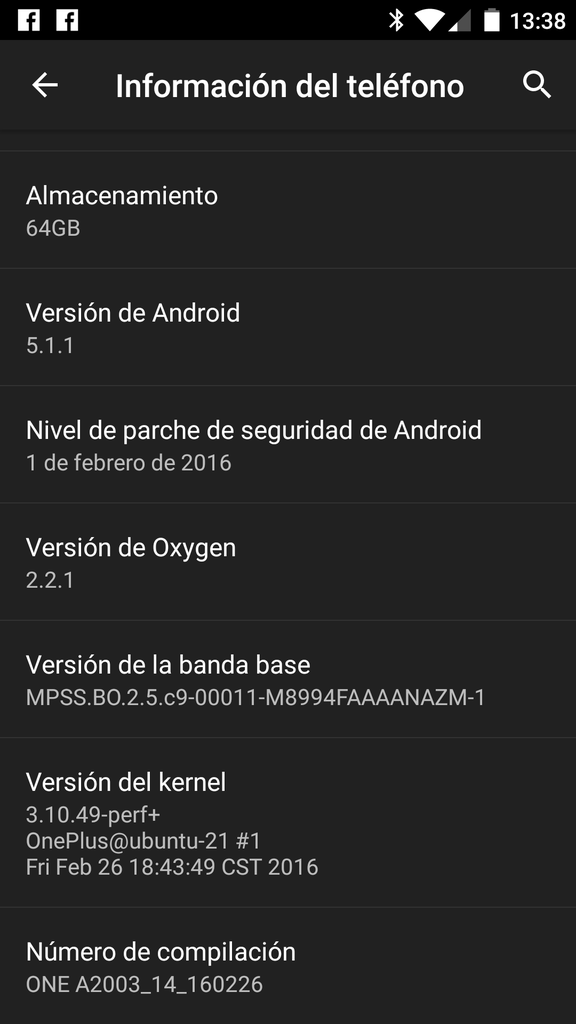
|
|
#18
17/04/16, 21:44:34
|
||||
|
||||
|
Cita: Originalmente Escrito por ertt
no entiendo que me quieres enseñas,en el mio no sale asi actualmente:
***TAPATALKING***
__________________
...AND JUSTICE FOR ALL...
|
|
 Estás aquí
|
||||||
|
||||||


![Array
[xs_avatar]](https://avatar.htcmania.com/avatares/avatar214909_1.gif)

![Array
[xs_avatar]](https://avatar.htcmania.com/avatares/avatar685285_87.gif)

![Array
[xs_avatar]](https://avatar.htcmania.com/avatares/avatar386046_4.gif)
![Array
[xs_avatar]](https://avatar.htcmania.com/avatares/avatar629844_30.gif)
![Array
[xs_avatar]](https://avatar.htcmania.com/avatares/avatar419360_3.gif)
![Array
[xs_avatar]](https://avatar.htcmania.com/avatares/avatar18406_2.gif)
![Array
[xs_avatar]](https://avatar.htcmania.com/avatares/unknown.gif)
![Array
[xs_avatar]](https://avatar.htcmania.com/avatares/avatar618979_3.gif)
![Array
[xs_avatar]](https://avatar.htcmania.com/avatares/avatar422658_9.gif)