Chuwi v88 Chuwi v88


Herramientas
  #181  
Viejo 01/11/13, 09:06:13
Avatar de kadoc
kadoc kadoc no está en línea
Miembro del foro
Mensajes: 478
Compra y venta: (2)
 
Fecha de registro: abr 2009
Mensajes: 478
Mencionado: 12 comentarios
Tagged: 0 hilos
Cita:
Originalmente Escrito por JOBRIMA Ver Mensaje
Gran trabajó kadoc, sabía que estabas en ello pero no había leído el proceso realizado, sorry. Sigues con la idea de hacerte el agujero? La has probado sin tapa y con esa peaso antena? Tiene que ser la leche
Lo de los agujeros de momento no lo hago.

Queria ver como os quedaba a alguno

Y sin tapa gana algo,aunque sinceramente no hay tanta diferencia de perdida de señal como con la de serie.

Responder Con Cita


  #182  
Viejo 01/11/13, 21:23:46
Avatar de JOBRIMA
JOBRIMA JOBRIMA no está en línea
Usuario muy activo
Mensajes: 3,716
Compra y venta: (8)
 
Fecha de registro: abr 2010
Mensajes: 3,716
Tu operador: Movistar
Mencionado: 37 comentarios
Tagged: 1 hilos
Cita:
Originalmente Escrito por kadoc Ver Mensaje
Lo de los agujeros de momento no lo hago.

Queria ver como os quedaba a alguno

Y sin tapa gana algo,aunque sinceramente no hay tanta diferencia de perdida de señal como con la de serie.
Gracias pues no descarto operar a la choni, nunca he soldado nada, es fácil hacerlo sin experiencia con paciencia y cuidado que de eso voy sobrado?
Responder Con Cita
  #183  
Viejo 02/11/13, 03:25:58
Avatar de kadoc
kadoc kadoc no está en línea
Miembro del foro
Mensajes: 478
Compra y venta: (2)
 
Fecha de registro: abr 2009
Mensajes: 478
Mencionado: 12 comentarios
Tagged: 0 hilos
Es muy facil...

Hice tuto de ello.
Responder Con Cita
  #184  
Viejo 02/11/13, 13:23:17
Avatar de merckado
merckado merckado no está en línea
Usuario muy activo
Mensajes: 926
 
Fecha de registro: sep 2012
Mensajes: 926
Tu operador: Movistar
Mencionado: 0 comentarios
Tagged: 0 hilos
Pues parece que problemas con el wifi no se salva ni el iPad mini, echad un vistazo a un extracto del foro de apple y lo "contento" que anda el personal con el tema del wifi.

iPad mini WIFI issue continued

19247 Views 22 Replies Latest reply: 30-oct-2013 12:20 by Gireeshkumar055
1 2 Previous Next
Level 1 (0 points)
wolfensteen
26-dic-2012 12:45
Dear Mr. Cook, dear Apple community,

as a true believer in Apple, I have stumbled over the iPad mini. So far any product I have bought from Apple has been a highlight and has provided much fun and satisfaction and professional results. The iPad mini has but destroyed that. I have owned it since one month and the' wifi issue' has caused me to buy two new routers, and make about as many phone calls to 'friends and experts' as in the worst pc times gone. Please, please, please tell me that this issue will disappear (iOS 6.0.2 has not done the job). Every other device in my house works just fine and I truly want to use and keep my iPad mini, but as Christmas has neared and has past with sentimentalities peaking, I'm slowly getting tired of reading blogs and forums dealing with it (iPad Mini and WIFI) not working properly. So my wish from Apple for Christmas is my iPad mini to work.
Thank you for reading and very happy holidays.
Sincerely Yours,
Wolfensteen

iPad mini Wi-Fi, iOS 6.0.2

Categories: Wi-Fi


  • Level 1 (0 points)
    27shutterclicks
    Re: iPad mini WIFI issue continued
    29-dic-2012 0:18 (in response to wolfensteen)
    I have the same issue. iPad mini's wifi locks after a certain period of time. Only fix is to turn wifi off and then on or renew the lease from the router.

    iOS 6.0.2 didn't do anything to fix the problem for me.

    I have other iPads, iPhones and other devices that work with the wifi just fine.

    Hopefully this gets fixed soon as it's extremely inconvenient.
    • Like (0)


  • Level 1 (0 points)
    GantB
    Re: iPad mini WIFI issue continued
    29-dic-2012 7:05 (in response to wolfensteen)
    I also have the same issue. I removed the encryption from my wireless network and just left it open. This seems to have solved my problem. I hate leaving my network open, but at least I live in a rural area with no other houses close. I'd be interested to see if this solves your problem. It looks like a software issue related to encryption on the ipad.
    • Like (0)


  • Level 1 (0 points)
    mrsmills2006
    Re: iPad mini WIFI issue continued
    29-dic-2012 7:33 (in response to wolfensteen)
    I set up my ipad mini yesterday and found (through googling) that you need to change the channel that your router is on. It recommended channel 6 but i found that slowed my internet, so i changed mine to 11 and the wifi fault seems to have rectified. Hope that helps!
    • Like (0)


  • Level 1 (0 points)
    chunkey_monkey
    Re: iPad mini WIFI issue continued
    12-ene-2013 10:18 (in response to wolfensteen)
    Dear wolfensteen, I have had exactly the same experience as you.

    Being an Apple fan, I have a MBA, iPad 1 and recently a new iPad Mini.

    The wi-fi performance on the iPad Mini is quite unacceptable. Unlike many others, I actually had working wi-fi on the device. But my complaint is the performance in terms of how far away from the router you can go and still use wi-fi.

    Basically the iPad Mini will work in the same room as the router, but when I go into another room, it is unable to connect. I have spent hours trying to get the iPad Mini working: I have tried 3 different routers, tried various settings and the results are the same. I have updated to iOs 6.2, reset the network settings, restored the iOs. Basically I have tried the entire spectrum of suggestions in this forum and elsewhere and no luck.

    In Summary at wi-fi signal strength levels where an iPad 1, a MBA and an HP laptop PC work perfectly, the iPad Mini does not work. I can only surmise that the new devices use wi-fi hardware/software that exhibits unacceptable range degradation performance.

    I have returned the iPad Mini to Apple as I believe it is a hardware design fault- too many folks have had issues for mine to be a one-off.

    We all would welcome a response from Apple to come clean and confirm if this is a software issue that will be fixed in iOs 6.1 or if it is a hardware issue that would imply a revision of the iPad Mini.
    • Like (0)


  • Level 8 (38.580 points)
    Texas Mac Man Richardson, Texas
    Re: iPad mini WIFI issue continued
    12-ene-2013 13:03 (in response to wolfensteen)
    Some things to try first:

    1. Turn Off your iPad. Then turn Off (disconnect power cord for 30 seconds or longer) the wireless router & then back On. Now boot your iPad. Hopefully it will see the WiFi.

    2. Go to Settings>Wi-Fi and turn Off. Then while at Settings>Wi-Fi, turn back On and chose a Network.

    3. Change the channel on your wireless router (Auto or Channel 6 is best). Instructions at http://macintoshhowto.com/advanced/how-to-get-a-good-range-on-your-wireless-netw ork.html

    4. Go into your router security settings and change from WEP to WPA with AES.

    5. Renew IP Address: (especially if you are droping internet connection)
    • Launch Settings app
    • Tap on Wi-Fi
    • Tap on the blue arrow of the Wi-Fi network that you connect to from the list
    • In the window that opens, tap on the Renew Lease button

    ~~~~~~~~~~~~~~~~~~~~~~~~~

    iOS 6 Wifi Problems/Fixes

    Fix For iOS 6 WiFi Problems?
    http://tabletcrunch.com/2012/09/27/f...wifi-problems

    Did iOS 6 Screw Your Wi-Fi? Here’s How to Fix It
    http://gizmodo.com/5944761/does-ios-6-have-a-wi+fi-bug

    How To Fix Wi-Fi Connectivity Issue After Upgrading To iOS 6
    http://www.iphonehacks.com/2012/09/fix-wi-fi-connectivity-issue-after-upgrading- to-ios-6.html

    iOS 6 iPad 3 wi-fi "connection fix" for netgear router


    Apple's iOS 6 Wi-Fi problems
    http://www.zdnet.com/apples-ios-6-wi...on-7000004799

    ~~~~~~~~~~~~~~~~~~~~~~~

    How to Fix a Poor Wi-Fi Signal on Your iPad
    http://ipad.about.com/od/iPad_Troubleshooting/a/How-To-Fix-A-Poor-Wi-Fi-Signal-O n-Your-iPad.htm

    iOS Troubleshooting Wi-Fi networks and connections http://support.apple.com/kb/TS1398

    iPad: Issues connecting to Wi-Fi networks http://support.apple.com/kb/ts3304

    WiFi Connecting/Troubleshooting http://www.apple.com/support/ipad/wifi

    How to Fix: My iPad Won't Connect to WiFi
    http://ipad.about.com/od/iPad_Troubleshooting/ss/How-To-Fix-My-Ipad-Wont-Connect -To-Wi-Fi.htm

    iOS: Connecting to the Internet http://support.apple.com/kb/HT1695

    iOS: Recommended settings for Wi-Fi routers and access points http://support.apple.com/kb/HT4199

    How to Quickly Fix iPad 3 Wi-Fi Reception Problems
    http://osxdaily.com/2012/03/21/fix-n...tion-problems

    iPad Wi-Fi Problems: Comprehensive List of Fixes
    http://appletoolbox.com/2010/04/ipad...list-of-fixes

    Connect iPad to Wi-Fi (with troubleshooting info)
    http://thehowto.wikidot.com/wifi-connect-ipad

    Fix iPad Wifi Connection and Signal Issues

    Fix Slow WiFi Issue https://discussions.apple.com/thread...rt=60&tstart=0

    How To Fix iPhone, iPad, iPod Touch Wi-Fi Connectivity Issue http://tinyurl.com/7nvxbmz

    Unable to Connect After iOS Update - saw this solution on another post.
    https://discussions.apple.com/thread/4010130

    Note - When troubleshooting wifi connection problems, don't hold your iPad by hand. There have been a few reports that holding the iPad by hand, seems to attenuate the wifi signal.

    ~~~~~~~~~~~~~~~

    If any of the above solutions work, please post back what solved your problem. It will help others with the same problem.

     Cheers, Tom
    • Like (0)


  • Level 1 (0 points)
    27shutterclicks
    Re: iPad mini WIFI issue continued
    19-ene-2013 20:10 (in response to wolfensteen)
    Looks like the issues with iPad Mini's Wi-Fi are mostly related with networks in the 2.4Ghz range.

    I used to have the Mini's internet connection lock after a certain amount of time, requiring me to either renew the lease of the IP, or turn Wi-Fi off and then on again to get it back working.

    Once I change my router to operate on the 5Ghz band, the locking issue went away. Similarly, as soon as I reverted back to 2.4Ghz, the locking starting again.

    The problem is that some of the devices I have, including an iPhone 4s and a Kindle, do not work with the 5Ghz network. So i have to choose on whether I want iPad Mini's connection to work or the other devices.

    This definitely is a problem that should be addressed by Apple.
    • Like (0)


  • Level 1 (0 points)
    SHarras
    Re: iPad mini WIFI issue continued
    26-ene-2013 2:43 (in response to wolfensteen)
    Exactly the same issue, wifi disappears and I have to enter all my wifi credentials again, so so annoying, can see why I should mess with my router setting when I have more than 20 wifi devices connected without any issues...

    Apple pull your finger out and sort the issue!!!!
    • Like (0)


  • Level 1 (0 points)
    jeraldjamescapao Fribourg, Switzerland
    Re: iPad mini WIFI issue continued
    26-ene-2013 3:19 (in response to wolfensteen)
    So far i have no problems with my ipad mini.
    Maybe your device has a factiry deffect?

    Only my problem with iOS 6.0.2 is that my battery drains so fast.
    • Like (0)


  • Level 3 (720 points)
    Kaka Dongguan
    Re: iPad mini WIFI issue continued
    26-ene-2013 3:51 (in response to SHarras)
    Hi Friends,

    I found the solution for this problem (because I faced it too): go to Settings>>General>>Reset>>Reset Internet Settings (the third option in IOS 6).
    Five minutes later my iDevice now works fine again.

    If the issue persists, forget wifi connection than sign in again.

    Hope it helps you guys too
    • Like (0)


  • Level 1 (0 points)
    sandbites
    Re: iPad mini WIFI issue continued
    26-ene-2013 20:48 (in response to wolfensteen)
    As an update. I have an ipad Mini 64G wifi only with ios 6.0. The Mini out o the box connected to all my networks effortlessly. One day it just wont connect to the wifi. After attempting several fixes short of standing on my head i decided to upgrade to iOS6.2.

    The upgrade partially solved the problem as i was able to connect to my main router, However it wont connect to the access point in the other part of the room. FYI the main router that it now connects to is a Cisco e2000 and it connects now on
    -5Ghz,
    -20Mhz, autochannel setting
    -WEP2 password.

    Still it will connect to my Netgear AV poweline extender, this is funny as it used to connect to the Netgear.

    Dear Apple, the above seems to be a is a quirk fix. The problem is still there, please fix this wifi problem.
    • Like (0)


  • Level 1 (0 points)
    hlkhl
    Re: iPad mini WIFI issue continued
    26-ene-2013 23:23 (in response to sandbites)
    It's bug of ios 6.01, my ipad 3 has this issue too.
    why other device no this issue, iphone 3gs, 4s, apple tv work fine.
    The only thing we can do is waiting for apple to update firmware.
    Apple....................you let me very disapointed.
    • Like (0)


  • Level 1 (0 points)
    wenwon
    Re: iPad mini WIFI issue continued
    27-ene-2013 9:41 (in response to wolfensteen)
    Same issue here on my mini. My Iphone 5 has no issue with connecting with the 5ghz frequency but my iPad mini keeps disconnecting from the network. The only fix at this moment is to go into settings and turn wifi off and on.

    This needs to be fixed.
    • Like (0)


  • Level 1 (0 points)
    madisonorbust
    Re: iPad mini WIFI issue continued
    28-ene-2013 21:37 (in response to wolfensteen)
    Four iPhones, four iPads, four MacBooks, one Apple TV, and one kindle can connect to this AirPort Extreme flawlessly. Ipad mini can't and 6.1 didn't help. Have tried enough troubleshooting to want to scream. First disappointment in 21 apple hardware purchases in the last 5 years
    • Like (1)


  • Level 1 (0 points)
    FNCHappyBanana
    Re: iPad mini WIFI issue continued
    05-feb-2013 15:13 (in response to wolfensteen)
    I had this same problem...I for some reason decided to change the password to my wifi. For those of you who are not familiar with this process, go to google and search how to change the wifi password for your specific router.

    After the password was changed, my ipad mini connected without a problem, so I decided to switch the password back to my old one, because I didn't want to have to change all the passwords around in my house...once again, the iPad connected without a problem.

    This is worth a shot, especially if you do not want to deal with having to exchange that brand new iPad, that you've spent a lot of money on...
    I also know that this can be a pain in the butt to do, and it shouldn't have to be done, but like I said, it's worth a shot, and hopefully helps out a few people on here.


    -Josh
Go to original post 1 2 Previous Next
  • Level 1 (0 points)
    gadgetgirlsue
    Re: iPad mini WIFI issue continued
    17-feb-2013 11:06 (in response to wolfensteen)
    I bought one of these at Best Buy, and the difference is like night and day. I use my Mini in my bedroom mostly, and my router was in my living room. I plugged this wi-fi booster into the bathroom next to my bedroom, and now the Mini instantly finds the signal and doesn't disconnect. I have 3 bars consistantly and can stream my Netflix with ease. It's worth a try. I got it at Best Buy for 34.99 and they said if it didn't work, I could get a full refund in 30 days.
    http://www.amazon.com/Netgear-WiFi-Booster-Mobile-WN1000RP-100NAS/dp/B008GGB342/ ref=sr_1_1?ie=UTF8&qid=1361127257&sr=8-1&keywords=netgear+boost+wifi
    • Like (0)


  • Level 1 (0 points)
    terefpat
    Re: iPad mini WIFI issue continued
    25-feb-2013 22:58 (in response to wolfensteen)
    I'm really upset with the iPad mini wifi issues. I sold my 1st gen iPad and bought my mini and the performance ***** in comparison to my 1G iPad. I'm in the military, live on base, and mostly use public wi-fi connections so I don't have all the options available to me as those with their own home wi-fi connections. Hope Apple gets this issue fixed sooner than later.
    • Like (0)


  • Level 1 (0 points)
    wenwon
    Re: iPad mini WIFI issue continued
    11-mar-2013 21:58 (in response to gadgetgirlsue)
    Same solution here. I got a wifi booster for upstairs because my router is in the basement. The mini never loses the signal anymore.

    I think the main issue is, the iPad mini has issues with reconnecting with a network when it is physically at the outer limits of a wifi network. While my iPhone has no issues with reconnecting to a network when it gets closer to a wifi source, the iPad mini simply won't reconnect as well.

    This is a definite issue if you're trying connect to a 5ghz network but the issue also happens in a 2.4ghz network. The booster was the only thing that worked.

    I've been using the mini for a day and I've had no dropped signals and I haven't had to manually reconnect to a wifi source.
    • Like (0)


  • Level 1 (0 points)
    charlotterun1987
    Re: iPad mini WIFI issue continued
    17-mar-2013 16:24 (in response to wolfensteen)
    My ipad mini would not connect to my home router, my iphone connects and my macbook does also but my new ipad mini was useless and would not work at all, i just kept getting a server message saying 'could not connect to server' and a 'time out ' message and ithe apps would load for a long time but not open or download. My wireless said I was connected at full strength.

    I have spent hours on phone troubleshooting and have sent my ipad mini back to be fixed, I was told there was no issue and it was returned. I then spent more hours on the phone to my internet provider and to apple again. the issue was left unresolved. They said if I go into a store they would replace the ipad for a new one. I did this today and got a new ipad that I checked worked in the store.
    I then came home and the same thing happened. It wouldnt connect, server messages kept coming up and some websites that would eventually load took forever.

    very frustrated at this point I came online and saw someone mentioned changing the wireless router channel from 6 to another number. I googled how to do this and changed my router channel to 2.
    My ipad mini worked immediately and has worked ever since at an amazing speed. All my other devices connected to my router also are now a lot quicker.
    So my advice is to change the wireless router channel and you should be in luck!
    • Like (0)


  • Level 1 (0 points)
    vaibhavyewale
    Re: iPad mini WIFI issue continued
    10-abr-2013 10:08 (in response to charlotterun1987)
    I am facing the same issue on my brand new iPad Mini. The wifi connection goes on and off every 5 mins. I tried all the solutions - resetting the router password, changing the router channel from 2 to 3 then to 5. Nothing works. Ironically this is my 1st Apple product and I had lot of expectations from it but I am extremely disappointed with this issue plus I am very upset with how Apple iStore staff disown this issue. I have multiple wifi devices at my home all of them work fine except iPad Mini.

    If this issue doesnt get fixed immediately from Apple's end I would really loose my trust in Apple as a brand. Wifi not working on an apple device is like unbelievable. I wonder what was the device testing & quality assurance team did before rolling out a device like this.
    • Like (1)


  • Level 1 (0 points)
    mcoffeyus
    Re: iPad mini WIFI issue continued
    01-jul-2013 16:09 (in response to wolfensteen)
    The issue I am facing was the same as you, but I replaced my netgear with an Apple Airport Extreme and I can my IPAD mini now connects nicely when I am at home. The problem is my IPAD mini still doesn't connect to the wifi of any hotel I have stayed at (my macbook does and my iphone 4s does). I have also tryed many other public hot spots, and npo connection. I connects nicely at the apple store, but they are using an apple router.

    This makes my IPAD useless outside the house, but I seldom travel, so I have been living with it. My wife's 1st Gen IPAD connects nicely at home and traveling. Does anyone have any luck with IPAD2 or 3? Is this just an IPAD mini issue?

    -Mike
    • Like (0)


  • Level 1 (0 points)
    Redwire
    Re: iPad mini WIFI issue continued
    12-oct-2013 14:08 (in response to wolfensteen)
    Hello, I am currently traveling with 2 iPhones and an iPad mini. The iPhones easily find and connect to wifi networks within 15 seconds. The mini however can take 5 minutes to find the network and often cannot connect, I have performed all the suggested options with no success. If you have iPad wifi issues do not waste your money buying a new router. iPad minis should be comparable with any router if your other devices can connect in the same locality. The mini is good however if you need to use wifi then stay with a normal iPad until the wifi issue is fixed by Apple.
    • Like (0)


  • Level 1 (0 points)
    Gireeshkumar055
    Re: iPad mini WIFI issue continued
    30-oct-2013 12:20 (in response to wolfensteen)
    Guys same problem with me so plz help me. I am living in qatar. I can't connect to airport wifi and some parks hotspots.. Plz help me


¿Y ahora os parece tan malo el wifi de la chuwi? Y ojo que hablamos de 350 pavazos que cuesta el iPad mini.

Algunos han decidido ampliar el radio de wifi con un repetidor como tb hemos explicado aquí, es la manera más fácil, rápida y "barata" de tener tu tablet con wifi en toda la casa sin problemas.

Última edición por merckado Día 02/11/13 a las 13:26:31
Responder Con Cita
Gracias de parte de:
  #185  
Viejo 02/11/13, 14:21:24
Avatar de JOBRIMA
JOBRIMA JOBRIMA no está en línea
Usuario muy activo
Mensajes: 3,716
Compra y venta: (8)
 
Fecha de registro: abr 2010
Mensajes: 3,716
Tu operador: Movistar
Mencionado: 37 comentarios
Tagged: 1 hilos
Jaja me parto:eek: lo que faltaba el ipad Mini con el chiringuito trasumante podemos patentar al menos el nombre que es muy cachondo o que se pasen por este foro, igual con la antena Hitachi lo arreglan

Última edición por JOBRIMA Día 02/11/13 a las 14:52:12
Responder Con Cita
Los siguientes 2 usuarios han agradecido a JOBRIMA su comentario:
  #186  
Viejo 02/11/13, 15:27:20
Avatar de cybxxx
cybxxx cybxxx no está en línea
Usuario muy activo
Mensajes: 2,280
Compra y venta: (1)
 
Fecha de registro: oct 2010
Mensajes: 2,280
Modelo de smartphone: iFive Mini3 Retina, SGS4, Choni V88
Versión de ROM: Voy Cambiando
Versión de Radio: No la escucho
Tu operador: Pepephone
Mencionado: 0 comentarios
Tagged: 0 hilos
Responder Con Cita
  #187  
Viejo 02/11/13, 20:45:36
Avatar de kadoc
kadoc kadoc no está en línea
Miembro del foro
Mensajes: 478
Compra y venta: (2)
 
Fecha de registro: abr 2009
Mensajes: 478
Mencionado: 12 comentarios
Tagged: 0 hilos
Si hay mucha pared de por medio pierde señal bastante...

en cuanto pueda os pongo un dibujo para aclarar mas esto
Responder Con Cita
  #188  
Viejo 03/11/13, 01:14:10
Avatar de niandubay
niandubay niandubay no está en línea
Usuario muy activo
Mensajes: 2,047
Compra y venta: (1)
 
Fecha de registro: may 2010
Localización: Barcelona
Mensajes: 2,047
Modelo de smartphone: OnePlus One
Versión de ROM: CyanogenOs Calkulins 3.7
Versión de Radio: Naanananaaa...
Tu operador: Pepephone
Mencionado: 5 comentarios
Tagged: 0 hilos
señores....estos días me fuí de puente y lo pasé p---s con el wifi.... se conectaba y todo, con dos...tres rallitas, pero se me desconectaba súper seguido...mirar una peli online desde la cama...una tortura...por cierto, como mola el xbmc...

a lo que voy... supernecesario el tp-link... me hubiera solucionado la vida...
incluso el modem 3g se puede obviar porque hacemos tethering con el movil, pero para aumentar el alcance de la wifi....por muy pocas pelas esta miniatura te soluciona los problemas...
yo llevo el cargador de coche para que no me deje colgado el movil, pero para la wifi lo vi superclaro, compra obligada.
Responder Con Cita
  #189  
Viejo 03/11/13, 03:20:23
Avatar de JOBRIMA
JOBRIMA JOBRIMA no está en línea
Usuario muy activo
Mensajes: 3,716
Compra y venta: (8)
 
Fecha de registro: abr 2010
Mensajes: 3,716
Tu operador: Movistar
Mencionado: 37 comentarios
Tagged: 1 hilos
Cita:
Originalmente Escrito por niandubay Ver Mensaje
señores....estos días me fuí de puente y lo pasé p---s con el wifi.... se conectaba y todo, con dos...tres rallitas, pero se me desconectaba súper seguido...mirar una peli online desde la cama...una tortura...por cierto, como mola el xbmc...

a lo que voy... supernecesario el tp-link... me hubiera solucionado la vida...
incluso el modem 3g se puede obviar porque hacemos tethering con el movil, pero para aumentar el alcance de la wifi....por muy pocas pelas esta miniatura te soluciona los problemas...
yo llevo el cargador de coche para que no me deje colgado el movil, pero para la wifi lo vi superclaro, compra obligada.
Doy fe
Responder Con Cita
  #190  
Viejo 03/11/13, 10:32:47
Avatar de boldo
boldo boldo no está en línea
Usuario muy activo
Mensajes: 1,950
Compra y venta: (11)
 
Fecha de registro: nov 2007
Localización: Toledo
Mensajes: 1,950
Modelo de smartphone: Redmi note
Versión de ROM: Miui
Tu operador: Orange
Mencionado: 10 comentarios
Tagged: 0 hilos
Cual es ese tplink mini? Se engancha al micro usb con un otg?
Responder Con Cita
  #191  
Viejo 03/11/13, 11:48:08
Avatar de niandubay
niandubay niandubay no está en línea
Usuario muy activo
Mensajes: 2,047
Compra y venta: (1)
 
Fecha de registro: may 2010
Localización: Barcelona
Mensajes: 2,047
Modelo de smartphone: OnePlus One
Versión de ROM: CyanogenOs Calkulins 3.7
Versión de Radio: Naanananaaa...
Tu operador: Pepephone
Mencionado: 5 comentarios
Tagged: 0 hilos
Esta súper explicado un poco mas atrás.
Responder Con Cita
  #192  
Viejo 03/11/13, 13:06:42
Avatar de boldo
boldo boldo no está en línea
Usuario muy activo
Mensajes: 1,950
Compra y venta: (11)
 
Fecha de registro: nov 2007
Localización: Toledo
Mensajes: 1,950
Modelo de smartphone: Redmi note
Versión de ROM: Miui
Tu operador: Orange
Mencionado: 10 comentarios
Tagged: 0 hilos
Cita:
Originalmente Escrito por niandubay Ver Mensaje
Esta súper explicado un poco mas atrás.
Cierto. había visto esto pero no sé por qué, cuando leí MINI tplink, pensé que sería algo más pequeño jeje

http://www.htcmania.com/showpost.php...&postcount=174

Yo ya tengo un cargador externo de 10.000, así que solo necesitaría el tplink cuadrado ese...aún así, lo veo un poco follón e incómodo montar todo eso...si te tienes que ir a la cama con ello, apaga y vámonos...pero bueno, en un momento de necesidad...quien sabe.

saludos y gracias
Responder Con Cita
  #193  
Viejo 03/11/13, 21:01:20
Avatar de boldo
boldo boldo no está en línea
Usuario muy activo
Mensajes: 1,950
Compra y venta: (11)
 
Fecha de registro: nov 2007
Localización: Toledo
Mensajes: 1,950
Modelo de smartphone: Redmi note
Versión de ROM: Miui
Tu operador: Orange
Mencionado: 10 comentarios
Tagged: 0 hilos
Por cierto, y algo más pequeño no podría haber?

http://www.miniinthebox.com/es/tp-li...FUrJtAod-HgAeg

Algo como eso, un usb pequeño que lo coloques a través de un OTG.

Saludos
Responder Con Cita
  #194  
Viejo 03/11/13, 22:21:32
Avatar de niandubay
niandubay niandubay no está en línea
Usuario muy activo
Mensajes: 2,047
Compra y venta: (1)
 
Fecha de registro: may 2010
Localización: Barcelona
Mensajes: 2,047
Modelo de smartphone: OnePlus One
Versión de ROM: CyanogenOs Calkulins 3.7
Versión de Radio: Naanananaaa...
Tu operador: Pepephone
Mencionado: 5 comentarios
Tagged: 0 hilos
Pero no sabemos como andará de compatibilidad...
Responder Con Cita
Gracias de parte de:
  #195  
Viejo 03/11/13, 22:28:34
Avatar de merckado
merckado merckado no está en línea
Usuario muy activo
Mensajes: 926
 
Fecha de registro: sep 2012
Mensajes: 926
Tu operador: Movistar
Mencionado: 0 comentarios
Tagged: 0 hilos
Cita:
Originalmente Escrito por boldo Ver Mensaje
Por cierto, y algo más pequeño no podría haber?

http://www.miniinthebox.com/es/tp-li...FUrJtAod-HgAeg

Algo como eso, un usb pequeño que lo coloques a través de un OTG.

Saludos
Generalmente android no tiene los drivers para esos dispositivos y no se le pueden instalar así como así. Pero tu solución es la de siempre ampliar el wifi, y sino quieres montar el "chiringuito trashumante" puedes comprar un tenda A5 (ebay, AE,...) y por unos 15€ lo enchufas a la corriente en un enchufe a medio camino entre la zona donde no te llegue el wifi y el router, de manera que te crea una nueva wifi con más potencia y te conectas sin problemas. Tiene el tamaño de un cargador de móvil, y no tiene ni cables ni nada, solo enchufado. Para que te hagas una idea queda como esos aparatos antimosquitos que van enchufados.
Responder Con Cita
Gracias de parte de:
  #196  
Viejo 03/11/13, 22:30:55
Avatar de JOBRIMA
JOBRIMA JOBRIMA no está en línea
Usuario muy activo
Mensajes: 3,716
Compra y venta: (8)
 
Fecha de registro: abr 2010
Mensajes: 3,716
Tu operador: Movistar
Mencionado: 37 comentarios
Tagged: 1 hilos
Cita:
Originalmente Escrito por boldo Ver Mensaje
Por cierto, y algo más pequeño no podría haber?

http://www.miniinthebox.com/es/tp-li...FUrJtAod-HgAeg

Algo como eso, un usb pequeño que lo coloques a través de un OTG.

Saludos
Cybxxx ha pedido uno similar, ya nos contará cuando lo reciba. Personalmente creo que no va a servir, no lo va a reconocer el otg por tema de drivers, ojalá me equivoque.
Responder Con Cita
Gracias de parte de:
  #197  
Viejo 03/11/13, 23:51:42
Avatar de JOBRIMA
JOBRIMA JOBRIMA no está en línea
Usuario muy activo
Mensajes: 3,716
Compra y venta: (8)
 
Fecha de registro: abr 2010
Mensajes: 3,716
Tu operador: Movistar
Mencionado: 37 comentarios
Tagged: 1 hilos
Hoy he recibido el adaptador ethernet, va perfecto, ofrece aun mas posibilidades de configuración, modo cliente etc. Al conectar por cable ya funciona el survey con lo que en menos de un minuto tienes el modo bridge configurado con cada nueva wifi.

Hoy lo he probado a fondo, he visto futbol, en streaming, yomvi, golstadium, clan los peques...en redes que antes ni se podía navegar.

Hay mods para meterle antena externa al router para redes aun mas lejanas, creo que voy a pillar un soldador y preparar todo incluso la antena Hitachi para mejorar la potencia sin el chiringuito montado.

Os pongo una foto, el aparato negro es un hub, que se puede evitar comprando un cable otg con dos tomas USB, el powerbank se puede evitar también, en la foto, de hecho, está sin el.

Responder Con Cita
  #198  
Viejo 04/11/13, 19:28:02
Avatar de JOBRIMA
JOBRIMA JOBRIMA no está en línea
Usuario muy activo
Mensajes: 3,716
Compra y venta: (8)
 
Fecha de registro: abr 2010
Mensajes: 3,716
Tu operador: Movistar
Mencionado: 37 comentarios
Tagged: 1 hilos
Cita:
Originalmente Escrito por kadoc Ver Mensaje
Buenas tardes. Lo prometido es deuda, y con bastante retraso debido a la espera de que me llegara la antena, que al final le compré a una persona una, pues vienen 2 en el paquete.

Cuento los pasos poco a poco.

Material:

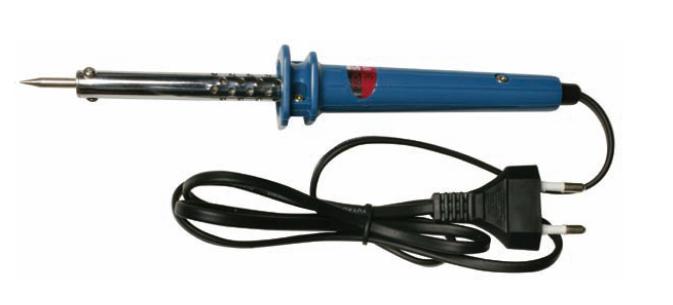
-Soldador chino 30w. Hay de 60w pero para esto el de 30 es perfecto. (6.40€)
-Estaño fino de ferretería (1.20€)
-Antena Hitachi de China (2.76€ - 2 antenas) http://www.ebay.es/itm/170805360706#ht_2154wt_1018

Y paciencia.


Mi intención era desoldar en la antena amarilla, pero al final no lo he hecho.
1ª opción. Pelando cables y uniendo. No me ha gustado y he decidido pasar a la opción 2.
Adjunto foto, es un poco chapuza la verdad, pero funcionaba también.


2ª Opción y última. Desoldar en la placa base de la chuwi, es decir calentar un poco sobre el estaño de las soldaduras y quitar los cables.

Foto de la antena original chuwi quitada


Posteriormente voy a cortar la antena Hitachi pues es muy larga. Y pelaré despacio con un cúter o similar separando la malla del plástico que cubre los hilos interiores de la antena. (vamos como una antena de casa de toda la vida). Además, como veis la antena es curvada en forma de L, le quitaremos esa forma y la dejaremos plana para que nos entre en la chuwi.


Una vez todo listo, ponemos el soldador a calentar y esperamos. El mío chino ya empezaba a oler a chamuscado al poco de encender .

Me ha ayudado la novia, mientras yo sujetaba con una mano el soldador y con otra el cable de la antena para soldar, ella me puso el estaño justo encima.

No hay que echar mucho, ya vais viendo que con un puntito más lo que tiene de la soldadura original ya vale.


Listo, ya sólo nos queda situar la antena. La pongo donde estaba la otra, es más, he tenido que cortar unos 2 mm de ancho de la chapa amarilla para que asentase bien.


y esto ha sido todo, cualquier duda o sugerencia será aceptada.

No sé a que distancia está el router, pues no tengo, lo tiene el vecino, pero si puedo decir que tengo 3 rayas de cobertura y me va muy bien. Me gustaría saber si tuviera el router cerca que alcance real tendría esto, pero ya lo probaré cuando vaya a casa de mis padres.

Evidentemente el alcance no es como el del portatil, pero si ha mejorado sustancialmente el mismo. Si os va mal, yo os lo recomiendo pues es muy fácil.

PD: algunos ya lo han hecho, pero para el que no, si teneis fugas de luz, aprovechar que la abrís para tapar donde haya, justo en los bordes con cinta aislante negra si puede ser.

Saludos.
Puedes poner el enlace donde has comprado el soldador?

Última edición por JOBRIMA Día 04/11/13 a las 20:24:59
Responder Con Cita
  #199  
Viejo 04/11/13, 19:45:12
Avatar de JOBRIMA
JOBRIMA JOBRIMA no está en línea
Usuario muy activo
Mensajes: 3,716
Compra y venta: (8)
 
Fecha de registro: abr 2010
Mensajes: 3,716
Tu operador: Movistar
Mencionado: 37 comentarios
Tagged: 1 hilos
Sigo flipando con el router, con la choni detecto 3 redes y con el router 63!!!

Mirar las capturas, y eso sin antena externa, cuando se la meta tiene que ser la auténtica repera


Responder Con Cita
Gracias de parte de:


  #200  
Viejo 04/11/13, 20:22:16
Avatar de cbd
cbd cbd no está en línea
Usuario muy activo
Mensajes: 5,625
Compra y venta: (17)
 
Fecha de registro: mar 2012
Localización: España
Mensajes: 5,625
Modelo de smartphone: Motorola Moto G (2013)
Versión de ROM: 4.4.4 (CM11)
Tu operador: Jazztel
Mencionado: 4 comentarios
Tagged: 0 hilos
Cita:
Originalmente Escrito por JOBRIMA Ver Mensaje
Puedes poner el enlace donde has comprado el soldador? Viene con estaño? Si no donde se compra en ferreterías? Perdona si es una pregunta chorra pero no tengo ni idea
en cualquier chino los tienes baratos y sin 3 semanas de espera...
Responder Con Cita
Gracias de parte de:
Respuesta

Estás aquí
Regresar   HTCMania > Foro Tablets / Laptops > Laptops y tabletas Chuwi > Otros modelos de Chuwi > Chuwi v88


Reglas de Mensajes
You may not post new threads
You may not post replies
You may not post attachments
You may not edit your posts

BB code is On
Las caritas están On
Código [IMG] está On
Código HTML está Off

Saltar a Foro


Hora actual: 11:55:38 (GMT +1)

Cookies settings
Powered by vBulletin™
Copyright © vBulletin Solutions, Inc. All rights reserved.
 
HTCMania: líderes desde el 2007