
10/05/12, 01:17:04
|
 |
Usuario muy activo
Mensajes: 5,290
|
|
Fecha de registro: may 2010
Mensajes: 5,290
Modelo de smartphone: Samsung Galaxy S8 +
Tu operador: Movistar
Mencionado: 69 comentarios
Tagged: 0 hilos
|
|
Cita:
Originalmente Escrito por fbanana

EL HOX tambien tiene Gorilla Glass 2.
|
Cierto es.
Cita:
Originalmente Escrito por fbanana
Si la pantalla del S3 es como la del Nexus, la mayoría opina que es mejor la del HOX, OTra cosa es que la del SIII sea mejor que la del nexus.
|
Se ha comentado en la preview de GSMARENA que la pantalla podria llegar a ser la mejor del mercado por todo lo que ofrece, habrá que ver si es mejor que la del HOX o no, de momento parece bastante mejor que la del Nexus.
Cita:
The good news is that even if the design is far from perfect, few people will actually be looking at it too closely. Who will waste time looking at the back of the I9300, when there is a screen as gorgeous as this at its front?
The 4.8" Super AMOLED of HD resolution at the front is where the Samsung I9300 Galaxy S III magic happens. The screen image quality is every bit as impressive as its specs suggest - tack sharp and with perfectly deep blacks, it's arguably the best you can find on the market.
The colors are nicely saturated by default, but the display settings menu offers you a choice between four different modes, so you can opt for more natural colors as well. We did prefer the livelier dynamic and standard modes, but the natural and movie modes will probably have their fans too. What's important here is that the S III display offers you flexibility that no other screen on the market can give you.
Sunlight legibility is splendid too - the HD Super AMOLED isn't the brightest around, but it's reflectivity is so low that even when outside in the brightest day, you'll still be able to make out what's on the screen quite clearly. The viewing angles are wide too - there's some color shift when you reach the extremes, but the icons and text remain almost perfectly clear, giving that painted on top of the glass look that we love so much.
|
Cita:
|
LA Pantalla del HOS la fabrica Samsung y dicen que los colores están mas logrados que la del SGN. Asi que quizás Samsung ha introducido las mismas variantes en su SIII.
|
Según comentan en dicha review, los colores son muy buenos y, si no te convencen, tiene 4 modos de color diferentes a elegir en el menu.
Cita:
Originalmente Escrito por fbanana
Pues no se han informado bien. La serie One incorpora un chip especial para Beats Audio.
|
Pues parece que si que es cierto que el chip beats del ONE X es bastante mediocre para lo que en teoría vende:
Cita:
Audio output could be better
After the flawless performance of the HTC One S in our audio quality test, we were hoping its bigger brother will deliver an equally smooth output.
However, the One X certainly started on the wrong foot, producing some pretty poor numbers in when connected to an active external amplifier. In the scenario where the HTC One S was virtually perfect, the One X let quite a lot of distortion creep in. Volume levels are also lower on the X than they used to be on the S, so the overall performance is hardly as impressive.
Things weren't perfect when we plugged in a pair of headphones either, even though the degradation wasn't as big as on some other smartphones. The stereo crosstalk takes a dip and the distortion levels increase further, while volume levels are average at best.
http://www.gsmarena.com/htc_one_x-review-747p5.php
|
Y por lo que se comenta, el chip Wolfson es de lo mejorcito en audio, algunos lo tachan como lo mejor del SGSIII:
https://twitter.com/#!/supercurio/status/198151127534018560
https://twitter.com/#!/supercurio/status/198149523724439553
Cita:
Originalmente Escrito por fbanana
Las camaras, tanto la de video y fotos hay que esperar a tener mas información del SIII. Aun así estoy seguro de que la camara del HOX va a ser un duro contrincante.
|
De primeras en gsmarena y en phonearena las fotos del HTC ONE X no han convencido, sin embargo en la preview del SGSIII si les ha parecido bastante buena entre las de 8mpx.
HOX
Cita:
The images that the HTC One X does introduce us to a good level of detail. We took our set of samples on a cloudy day, and this let us put the ImageSense camera to the test. And although the level of detail is clearly not 8MP, it's still pretty decent. What's not so decent is the level of noise that we see in the shots. It turns out the sharpness of the images was at the expense of noise. This effect is actually stronger than usual due to the slight oversaturation of the shots. In order to make the images more appealing, the camera is boosting the saturation of the colors, which is OK, if done reasonably. The color balance itself is quite good; images appear natural-looking, though in some of the shots the oversaturation was simply too much. There is also this color artifact visible in one of the images below, where the edges of the tree's branches have come out purple, but let's say that this has been an isolated issue.
http://www.phonearena.com/reviews/HT..._id2993/page/3
|
Cita:
8MP camera fails to inspire
The HTC One X packs an 8MP camera that does stills of up to 3264x2448 pixels and records 1080p video @ 30fps. There's an LED flash / video light too.
The camera interface is the same for both the still camera and the video camera - no they don't "look alike", the camera just has the UI shared between both functions.
The right-hand side features the Effects button, shutter key, camcorder record key and a shortcut to the gallery that shows the last photo taken. On the left is the flash setting toggle, general settings and shot mode (we'll get back to that in a moment).
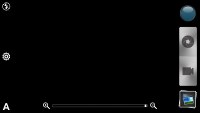 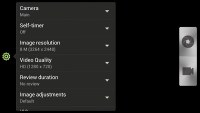
HTC One X camera interface
To snap a photo, you tap the shutter key. To record video you tap the button below - and you can still tap the shutter key to snap a full-res photo, even while recording video. Another cool option is the burst mode, which we mentioned in the gallery - you press and hold on the shutter key and it will snap multiple photos and let you pick which one to keep (you can keep all of them of course).
The effects button brings out a tab on the left with the usual set of color effects (sepia, solarize and so on). There's also some other cool effects such as shallow depth of field , which lets you blur parts of a photo that fall outside a predefined circular area. It's like having Instagram built right into the camera app UI.
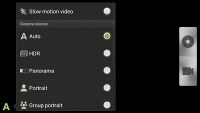 
Additional options and effects
All this is pretty cool, but we had one problem with this combined interface - if you want full 8MP resolution still shots, you have to disable the Widescreen option. But then it becomes hard to frame a 16:9 video in the 4:3 view finder. That's made even worse when shooting 720p video. The field of view in that mode is narrower than what the viewfinder shows and framing involves a lot of guesswork.
The HTC One X has touch focus and face detection; geotagging and smile shutter are also enabled.
Continuous autofocus is available too which is good to have on a phone like the One X with no hardware shutter key (the virtual shutter key cannot trigger autofocus either, it does burst mode). On the downside, the continuous autofocus may be way off in some shots - the only way to be certain you have it right is to tap and hold on the spot of the screen where you want the focus to be.
The shot mode button offers some more cool stuff - HDR photos, Panorama (with a gyro horizon), portrait, group portrait, landscape, whiteboard, close-up and, finally, low light.
Group portrait is quite cool - we've seen something like it before in the Scalado Rewind. It snaps multiple photos and for each face (and the One X can track many faces), the phone automatically picks the one where that person is smiling and didn't blink.
HTC took the camera hardware seriously this time - an f/2.0 aperture and a dedicated image processing chip clearly show they mean business. However the image quality is not quite the best in the 8 MP league - the One X produces rather noisy, if nicely detailed photos. Colors are nice, but tend to be a bit over-saturated at times. Sharpening algorithm is a tad too aggressive, too, resulting in occasional artifacts.
We've prepared a bunch of samples for you guys below, check them out.
  
HTC One X camera samples
The camera captures images really fast, thanks to the built-in image processing chip. We also liked the fact that images (by default) don't get in the way - once you've snapped a shot it quietly pops-up in the preview box in the bottom right, without instant preview, and you're free to snap away.
 
HTC One X camera samples
The One X offers HDR mode too. Here's a comparison of a scene with HDR off and on. The result is okay, but if you don't like the exaggerated HDR look, it might not be your thing.
 
HDR Off and ON
We also snapped a couple of close-ups with the HTC One X. The focus innately captures macro photos but opting for the dedicated close-up preset does give you an extra millimeter or two to work with. Overall we're pleased with the amount of produced detail.
  
HTC One X macro samples
HTC are bragging about the instant photo capture during video recording and we decided to give it a spin. The photos are taken in 16:9 aspect ratio and are in 3264 x 1840 resolution. The idea is that you can snap fast-paced pics while you're recording a video.
The results came out really nice with good detail and motion blur is kept in check. Here are the samples.
 
HTC One X 16:9 in-video samples
Photo quality comparison
The HTC One X joins the other 8MP shooters in our Photo Compare Tool. The tool's page will give you enough info on how to use it and what to look for.
The first two charts play to the One X strengths and shows it as a good shooter, though still not the best in the 8MP game. The third chart shows good too, but also some artifacts due to the sub-optimal processing of the One X.
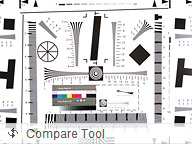 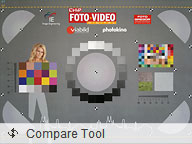 
HTC One X in our Photo Compare Tool
1080p video recording could be better, too
The One X records 1080p or 720p videos at 30fps and it can snap photos while at it. You can also use touch focus and even toggle the video light - that's during recording!
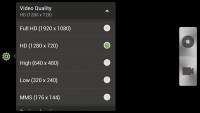
The camcorder UI
Videos are stored in MP4 files and use H.264 encoding. 1080p videos have a rather low bitrate - 10Mbps or less and compression clearly takes its toll on the amount of detail resolved. The colors are a tad oversaturated and while noise is decently low, the One X is hardly the best smartphone for shooting video on the go.
On the positive side the One X camera boasts stereo audio recording and keeps the framerate close to the promised 30fps (at least in good light).
The 720p videos captured by the Once X are decent. They only use half the bitrate (makes sense since 720p is about half as many pixels as 1080p). You should keep in mind their field of view is narrower than the 1080p videos.
Here goes an untouched sample 1080p@30fps video clip and a 720p@30fps video clip.
And here's a video uploaded to YouTube for you to enjoy right in your browser. Don't forget to click 1080p on the FullHD video sample and open the video fullscreen.
We've also prepped a 720p video sample taken with the One X.
The HTC One X also shoots slow-motion videos but the resolution drops significantly - you get 768x432 at 2.4Mbps bitrate. HTC didn't give an official number, but we measured it at a 3x slo-mo
http://www.gsmarena.com/htc_one_x-review-747p6.php
|
SGSIII
Cita:
8 MP snapper is improved
The Samsung Galaxy S III offers the same camera in terms of pixels but actually improves on the performance. It can capture stills with resolution up to 3264 x 2448 pixels and 1.9 MP ones with the front-facing cam.
The sharpshooter on the latest Galaxy offers geo-tagging, touch focus, face and smile detection and digital image stabilization. Due to the fast quad-core processor it is also able to simultaneously record HD (1080p and 720p) video and take near full-resolution pictures (those are cropped to an aspect ratio of 16:9 to match that of the videos).
The camera app interface is quite similar to the one on the Galaxy S II. You get two shortcut bars on each side of the viewfinder - on the right you get the still camera / camcorder switch, virtual shutter key and the gallery shortcut (which is a thumbnail of the last photo taken).
On the left you get several controls and the good news is that you can pick any five shortcuts to put there - you can easily put all commonly used features just a tap away.
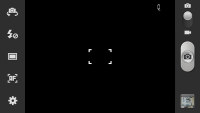 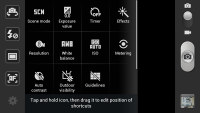
Samsung Galaxy S III camera UI
The Galaxy S III's sensor offers an F/2.6 aperture as opposed to the F/2.65 of its predecessor and a focal length of 3.7 mm contrasting with the 3.97 mm of the Galaxy S II. This results in a slightly wider viewing angle on the Galaxy S III compared to its predecessor, so you'll be able to fit more in your photos.
We've prepared a quick comparison between the two below. The Galaxy S III indeed offers slightly higher resolution, but it also tends to go a bit too far with the color saturation. The images are certainly looking punchier now, but also a little less realistic.
 
Samsung Galaxy S III • Samsung Galaxy S II
 
Samsung Galaxy S III • Samsung Galaxy S II
The dynamic range of the images produced by the Samsung I9300 Galaxy S III is pretty pleasing too and, despite the high saturation, noise is kept well under control. We'll need to do some more pixel-peeping before we can tell if the Galaxy S III is the best 8 megapixel camera out there, but it's certainly in the running.
  
  
Samsung Galaxy S III camera samples
Samsung was bragging left and right about the zero shutter lag of the Galaxy S III and we are happy to report that the smartphone is able to deliver. Pictures are captured extremely fast and there's even a burst mode available where you hold the virtual on-screen shutter and the phone will make 20 consecutive shots in just 6 seconds or so.
The good thing is that the images, produced by burst mode are in full 8 MP resolution. Samsung told us that the S III is actually capable of capturing full res shots at 3.3fps for much longer than that, but it has artificially imposed the 20 shots limit to prevent users from filling their storage with hundreds of identical shots.
http://www.gsmarena.com/samsung_gala...view-757p5.php
|
La gente está usando las fotos del HOX del análisis para compararlas con el preanálisis del SGSIII y la mejor a simple vista es la del samsung pero creo que al ser en diferentes días no es justo y habrá que esperar a los tests sintéticos.
En cuanto a video, leelo tu mismo:
Cita:
Video recording is top notch
The Samsung Galaxy S III is able to record FullHD 1080p and HD 720p video hassle free. During recording you can also snap full-res 16:9 stills if need arises.
The camcorder interface is almost the same as the camera one - you get the same customizable panel on the left for up to five shortcuts.
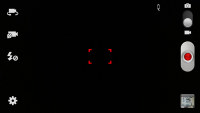 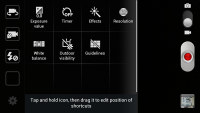
Samsung Galaxy S III camcorder UI The videos themselves are incredibly smooth and offer a great amount of detail. The Galaxy S II was a great performer in terms of video capture but the S III seems to do even better, resolving even more detail and offering better color rendition. The video container used is mp4 and it creates clips with a bitrate of of about 17Mbps with stereo sound recording.
|
Además, tal y como han comentado, el bitrate es bastante mayor en los videos del SGSIII sobre todo porque el HOX no graba en High profile.
En cuanto a las características de software que trae el SGSIII, a mi me parecen bastante interesantes y me gustaría saber si hay algo similar en el HTC ONE X porque yo personalmente lo desconozco.
Última edición por oXUnknownXo Día 10/05/12 a las 01:46:18
|