
21/06/17, 09:14:41
|
![Array
[xs_avatar]](https://avatar.htcmania.com/avatares/unknown.gif)
|
Usuario poco activo
|
|
Fecha de registro: may 2017
Mensajes: 22
Modelo de smartphone: Huawei P10 Lite
Tu operador: Movistar
|
|
Algunos pedian Firmware para Huawei P10 Lite pues he conseguido estas paginas:
stock ROM on Huawei P10 Lite with the latest B130 Nougat firmware in UK, Europe
https://www.getdroidtips.com/huawei-...ugat-firmware
This updates your Huawei P10 Lite with the latest B131 Nougat firmware in Europe
https://www.getdroidtips.com/huawei-...ugat-firmware
stock ROM on Huawei P10 Lite with the latest B120 Nougat firmware WAS-L03T (Latin America)
https://www.getdroidtips.com/huawei-...ugat-firmware
stock ROM on Huawei P10 Lite with the latest B126 Nougat firmware WAS-LX1A (Italia)
https://www.getdroidtips.com/install...awei-p10-lite
stock ROM on Huawei P10 Lite with the latest B130 Nougat firmware WAS-L21 (Rusia)
https://www.getdroidtips.com/b130-no...awei-p10-lite
stock ROM on Huawei P10 Lite with the latest B110 Nougat firmware WAS-LX1A (Orange Carrie)
https://www.getdroidtips.com/b110-no...awei-p10-lite
stock ROM on Huawei P10 Lite with the latest B130 Nougat firmware WAS-LX1A (Francia)
https://www.getdroidtips.com/downloa...-bytel-france
stock ROM on Huawei P10 Lite with the latest B114 Nougat firmware WAS-LX1A (Alemania)
https://www.getdroidtips.com/huawei-...ougat-germany
Instalación Normal:
- First of all, Download the Update Package
- Recommended : Format the Micro SD card (This operation is optional).
- Now Unzip the Update.zip package and
- Copy the entire dload folder (with UPDATE.APP in it) to the root directory of the Micro SD card.
- Now on your phone, Open the dialer and call ->enter: *#*#2846579#*#* ->ProjectMenu->Software Upgrade->SDCard Upgrade->OK,
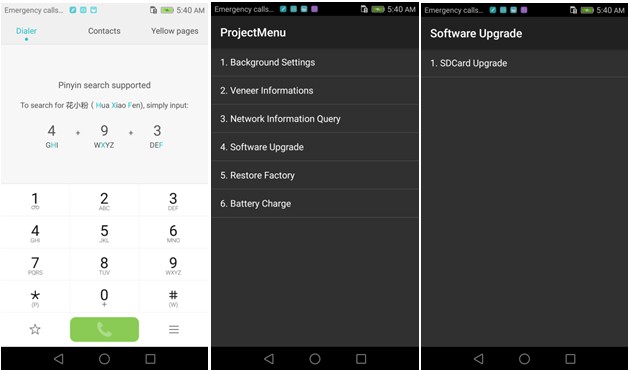 - Now select the Update.app that you moved to SD Card (root directory).
- Now you will see a screen which shows the installation process.
-
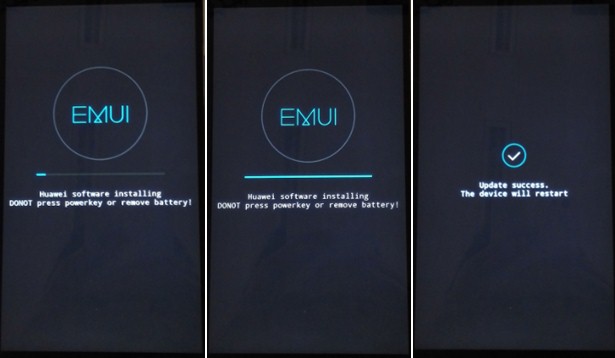
- Wait untill the installation process completes.
- When the progress bar stop, the phone will restart automatically
- In case if you have the Data File and you want to flash it, then first of all delete the earlier moved update.app from the dload folder
- then you can extract the second file (update_data_Xxxxx) from above and move the new update.app to the dload folder.
- repeat the same 4-8 Steps above.
- That's it ! You have Installed Stock Firmware on Huawei Smartphone.
Modo forzado:
- First of all, Download the Update Package
- Recommended : Format the Micro SD card (This operation is optional).
- Now Unzip the Update.zip package and
- Copy the entire dload folder (with UPDATE.APP in it) to the root directory of the Micro SD card.
- After Copying the Update.app, Turn off your phone.
- Make sure your handset is power off.
- Now Press the VOLUME UP and VOLUME DOWN key, and then press the POWER key to power on the phone and enter the Software Upgrade Mode.
- When the progress bar stop, the phone will restart automatically.
-
- To Update the Data File, You can follow the Normal Upgrade.
En cada enlace explica como instalar los firmware, ahora cada uno bajo su responsabilidad.
Saludos
Última edición por Mencey.Android Día 23/06/17 a las 09:04:07.
|